

Most hacked websites aren’t targeted personally. Attackers use automated tools that scan thousands of sites for weak passwords, outdated plugins and unpatched software, then break into whichever ones fail the test. That’s good news, because website hacking prevention mostly comes down to closing the easy gaps. This guide explains how attacks happen, how to harden your site, how to spot trouble early and exactly what to do if the worst happens. Whether you run a blog, a business site or an online store, you’ll leave with a clear plan you can start on today.
What Is Website Hacking?
Website hacking is unauthorised access to a website, its server or its data. Attackers may steal customer information, inject spam or malicious code, redirect visitors, deface pages or use your server to attack others. Most of it is automated and opportunistic, which is why small sites get hit just as often as big ones.
Why Website Hacking Prevention Matters
A hack costs far more than the cleanup:
- Lost trust: Visitors who see warnings or spam rarely come back.
- Search damage: Google may flag your site as unsafe or remove it from results.
- Downtime and lost sales: Your site may be suspended by your host while it’s investigated.
- Data exposure: Leaked customer details can create legal and reputational problems.
- Cleanup effort: Recovery usually takes far longer than prevention would have.
Common Types of Website Attacks
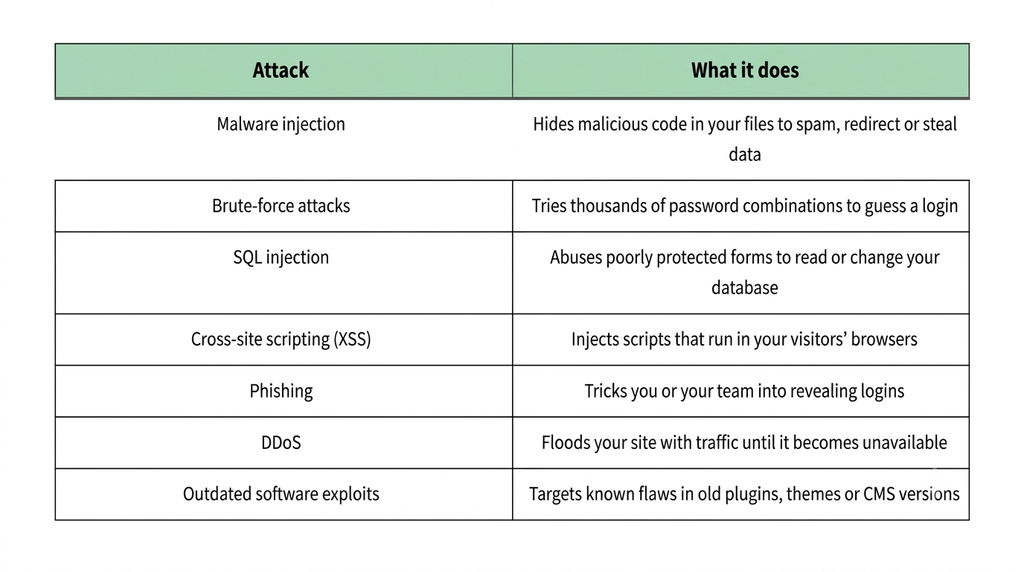
The most common attacks are malware injection, brute-force logins, SQL injection, cross-site scripting (XSS), phishing and DDoS.
How Do Websites Get Hacked?
Most break-ins come from weak or reused passwords, outdated software, vulnerable plugins or themes, insecure hosting and stolen credentials.
Notice that few of these need advanced skill to exploit. They rely on something being left unfixed.
Part 1: How to Prevent Website Hacking
1. Use strong, unique passwords
Use long passwords (12 to 16 characters or more) that you don’t reuse anywhere else, and store them in a password manager. Apply this to your CMS, hosting, FTP, database and email accounts.
2. Turn on two-factor authentication
Two-factor authentication (2FA) asks for a one-time code in addition to your password. Enable it on your hosting control panel, CMS admin, domain registrar and email. A stolen password alone then isn’t enough.
3. Keep everything updated
Update your CMS, plugins, themes and PHP version promptly. Attackers actively scan for sites running versions with known flaws. Delete anything you’re not using, since inactive plugins and themes can still be exploited.
4. Install SSL and force HTTPS
SSL encrypts data between your site and visitors. If you haven’t done this yet, see our guide to SSL setup in cPanel.
5. Limit logins and user access
- Give each person their own account instead of sharing one login.
- Assign the lowest role that lets someone do their job.
- Remove accounts for former staff, freelancers and agencies.
- Change the default “admin” username and limit login attempts.
6. Use a web application firewall and malware scanning
A web application firewall (WAF) filters malicious requests before they reach your site. Malware scanning checks your files for known threats. Many hosts include tools such as ImunifyAV, Imunify360 or ModSecurity, so check what your plan offers and make sure they’re turned on. Our guide on how to secure your cPanel hosting account covers the account-level settings in detail.
7. Set safe file permissions and use SFTP
As a general guide, folders are commonly set to 755 and files to 644. Avoid 777. Use SFTP rather than plain FTP so your login details are encrypted.
8. Back up your site regularly
Backups don’t stop an attack, but they make recovery possible. Keep daily or weekly copies depending on how often your site changes, store at least one off the server and test restores now and then.
9. Protect your forms and databases
Use well-maintained plugins and frameworks that sanitise user input, add CAPTCHA or similar protection to forms, and avoid exposing database tools publicly.
10. Choose secure hosting
Your host is part of your defence. Look for account isolation, firewalls, malware protection, automatic backups and responsive support. Our 15-point checklist on what to check before buying web hosting covers what to compare.
Part 2: How to Detect a Hacked Website
Warning signs include unexpected redirects, strange pages or links, browser or Google warnings, sudden traffic changes, unknown admin users and spam sent from your domain.
Search for:
- Sending people to pages on your site they do not know
- Pages or links you didn’t create, often in another language or about drugs, gambling or loans
- A warning that says “Deceptive site ahead” or “This site may be hacked”
- New admin users not added by yourself
- Recently changed files you did not edit
- A sudden slow down, traffic spike or high resource usage
- Customers reporting your domain for spam
- Security Notifications from your Host or Google Search Console
How to verify:
- Run a malware scan through your host’s tools or a trusted security plugin.
- Check Google Search Console for security issues and manual actions.
- Review your user list for unfamiliar administrators.
- Look at recently modified files in your file manager.
- Check access and error logs for repeated login attempts or odd requests.
- Test your site from a different device and network, and as a logged-out visitor, since some malware only targets visitors arriving from search.
Part 3: How to Recover from a Hacked Website
Isolate the site, change every password, remove the malware or restore a clean backup, close the vulnerability and then monitor for reinfection.
- Don’t panic, and don’t delete everything. Evidence in your logs and files can show how the attacker got in.
- Contact your hosting provider. They can help identify the issue, and may temporarily suspend or isolate the account to stop it spreading.
- Put the site in maintenance mode if possible, so visitors aren’t exposed.
- Change all passwords from a clean device: hosting, cPanel, FTP, database, CMS, email and domain registrar.
- Remove the malware or restore a clean backup. Restoring from a backup made before the infection is often the fastest route, but confirm the backup is actually clean.
- Update everything and delete outdated or unused plugins, themes and users.
- Look for backdoors. Attackers often leave hidden access, such as unknown admin users, odd cron jobs or disguised files. If you miss one, the hack can return.
- Fix the cause. Find out how they got in, whether it was a weak password, a vulnerable plugin or something else, so you don’t repeat it.
- Request a review if Google flagged your site. In Search Console, use the Security Issues report to request a review once the site is clean.
- Monitor closely for a few weeks for signs of reinfection.
If your site handles customer data, check whether you have legal or contractual obligations to notify affected people. For anything serious, consider professional incident response help.
When to Call a Professional
DIY cleanup works for minor problems, but get expert help if:
- The malware keeps coming back
- You handle payments or sensitive customer data
- Your site is blacklisted and you can’t resolve it
- You can’t find the entry point
- You don’t have a clean backup
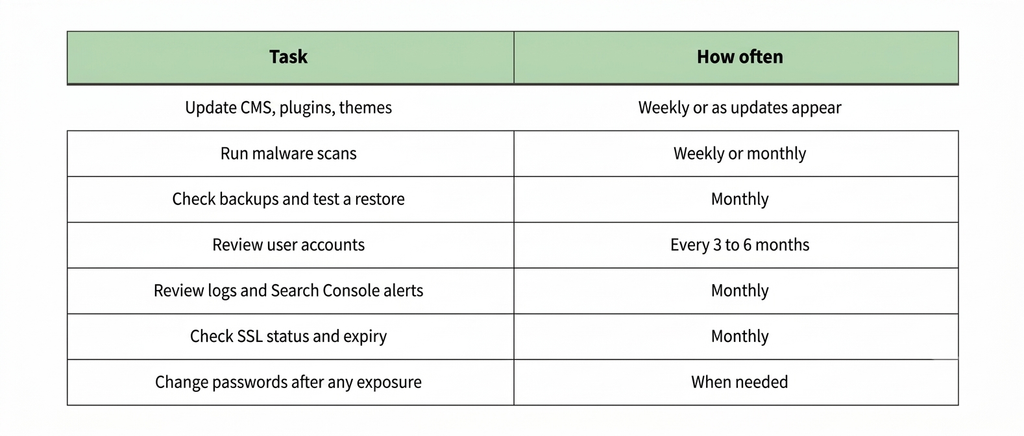
Website Security Checklist
Conclusion
Website hacking prevention is not about perfection. It is about being harder to hack than the next site. Use strong passwords with 2FA, keep your software up to date, run a firewall and scans, and back up often. Know the warning signs so that you can catch problems early, and have your recovery steps prepared so that you can react calmly if something goes wrong. A bit of routine maintenance now will save days of stress later.
Frequently Asked Questions
1. How can I prevent my website from being hacked?
Create strong, unique passwords and enable two-factor authentication. Update your CMS, plugins, and themes. SSL Firewall and malware scan running. Limit access to users Backup often
2. How do I know if my website has been hacked?
Common indications: Unexpected redirects Unknown pages or admin users Browser or Google security alerts Abrupt traffic/performance changes Spam on your domain.
3. What should I do first if my website is hacked?
Get in touch with your hosting provider. From a clean device change passwords. If possible, take the site offline or put it in maintenance mode. Scan for malware or restore to a clean backup.
4. Can a hacked website be fully recovered?
General » Most sites are restored from a clean backup or by careful malware removal. The key is finding and fixing how the attacker got in, or you will most likely get re-infected.
5. Are small websites targeted by hackers?
Uh-huh. Smaller sites are being hit all the time. Most attacks are automated . They look for vulnerabilities , not specific sites .
6. Does a hacked website affect SEO?
It can. Google can de-rank your pages or remove them from results. They have the ability to provide security warnings. Once the site is cleaned up and gone over rankings usually return, but that takes time.
7. How often should I back up my website?
It is contingent upon how frequently your content changes. A blog may only need to be backed up once a week but a store taking orders may need to be backed up daily. I do have at least one off-server backup.
