

Your website is often the first point of contact that customers have with your business. If it goes down, slows or becomes unreliable, visitors may leave before completing a purchase or contacting you. Website monitoring helps businesses detect these issues early and respond before they cause major losses.
Website monitoring keeps an eye on your website, server, security certificates, applications and performance around the clock. “It provides visibility to businesses on availability and helps teams respond in real time when things go wrong.”
What Is Website Monitoring?
Website monitoring is the continuous tracking of a website or online application for problems with performance such as availability, speed, errors, etc. Your website will be checked regularly by monitoring services, and logged if it is responding correctly.
An uptime monitor, for example, might check your website every minute. If the website goes down the system can notify you instantly by email, SMS or some other notification channel.
This way your team can investigate the problem and you won’t get an earful from a disgruntled customer.
Why Uptime Monitoring Matters
Even a few minutes of down time can impact customer trust, sales and search visibility. This can be especially damaging for eCommerce stores, financial services, SaaS platforms and sites that rely on online leads.
Uptime monitoring helps the businesses:
- Rapidly identify website outages
- Reduce time to resolve incidents
- Identify recurring availability problems
- Business objectives measured by uptime
- Maintaining the customer experience
- Check for resilience of hosting and infrastructure
It can also bring together in one place uptime percentages, response times, outages, and historical performance on a monitoring dashboard.
Track Website Response Time
You don’t need a site to be totally down to be a problem. Slow response times can also frustrate visitors and this can increase abandonment.
Response time monitoring is about how quickly your website responds to requests. A slow response time might mean a server is overloaded, there are database problems, the code isn’t efficient, there are network issues, or traffic has spiked.
Measure performance against your regular traffic and infrastructure. Alerts can help your team investigate before the problem gets worse, when response times exceed those thresholds.
Monitor SSL Certificates
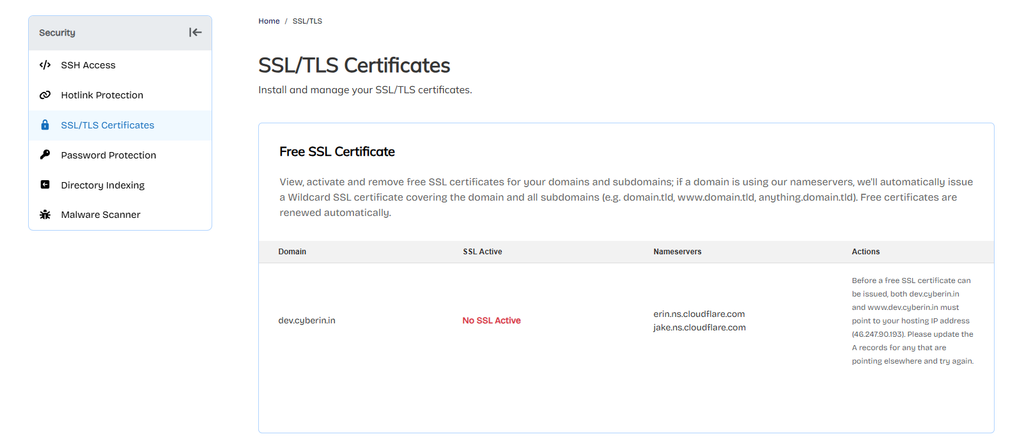
SSL certificates protect the data sent from your website to its visitors. If a certificate has expired, your visitors may see browser warnings and lose trust in your website.
SSL monitoring checks the certificate and can notify you before it expires. This is particularly useful in case the company has multiple domains or websites.
Keep an eye on your certificate’s status and set reminders to renew before it expires. Automated alerts will help you avoid an avoidable security and availability issue.
Monitor Server Resources
Your website needs server resources such as CPU, RAM, storage and bandwidth. When these run out websites can slow down or stop responding.
By monitoring your server resources, you can see when there is unusual usage. Many things can cause sudden CPU spikes, including increased traffic, a faulty script, a background process, or a security issue.
With this regular monitoring you will know the resource usage and can decide when your hosting plan or server configuration needs to be changed.
Application Performance Monitoring
Today, websites are often powered by databases, APIs, plugins, payment systems and other services. Monitoring uptime alone will not show you problems within those components.
Application performance monitoring gives you more visibility into application errors, database queries, API responses, and transaction performance.
For example, monitoring can determine that the checkout process in an online store has failed, yet the home page is still available.
Alerts and Incident Response
The value of monitoring is so you can get alerts to the right people as soon as possible. Create alerts for critical events such as downtime, slow page load times, SSL certificate expiry and resource exhaustion.
Your team should also have a simple process for incident response. Determine who will be notified, who will investigate the problem, and when to escalate the incident.
Track outages and causes of outages. By looking at the past you can often see a pattern and avoid repeating the same problems.
Monitoring Tools and Dashboards
Many monitoring tools provide dashboards that display uptime, response time, SSL status, server health, and incident history. A useful dashboard should make important information easy to understand.
For example, a business dashboard might show:
- Uptime: 99.98%
- Average response time: 420 ms
- SSL status: Valid
- Current incidents: None
- Server CPU: 48%
- Last outage: 12 minutes
These metrics give technical and business teams a quick overview of website health.
Understand SLAs
A Service Level Agreement (SLA) describes the expected availability of service from a provider to a customer. For example, a hosting provider might give a 99.9% uptime guaranty.
Businesses need to know what their SLA covers, how downtime is calculated and what exclusions there are. Monitoring your own website also provides you with independent performance records that could help in reviewing service issues.
Best Practices for Website Monitoring
First, the important stuff about your online presence. These are normally your core website, login pages, checkout, APIs, SSL certificates and mission critical applications.
Choose appropriate alert thresholds and do not send notifications for minor issues that do not require immediate action. Periodically test your alerts to ensure they reach the appropriate team members.
Month. Review reports and use data to improve hosting, applications, security and infrastructure.
Conclusion
Monitoring your website is a key part of a reliable web presence. Uptime checks will identify outages, while monitoring of SSL, server and application can provide further insight into website health and response time.
Regular monitoring is also good for businesses of all sizes. Known alerts, useful dashboards, incident procedures and performance reviews will enable you to find problems sooner and provide your customers with a more reliable website experience.