

Creating a website in 2026? First of all you need two things. A web host and a domain name. And honestly, most folks who are new to this don’t know how domain hosting works or how to wire everything up properly.
How to set up a website from scratch, including getting a domain and pointing it to your hosting with DNS and nameservers.
For people who have never done any of this before, and don’t want to fall into the usual pitfalls.
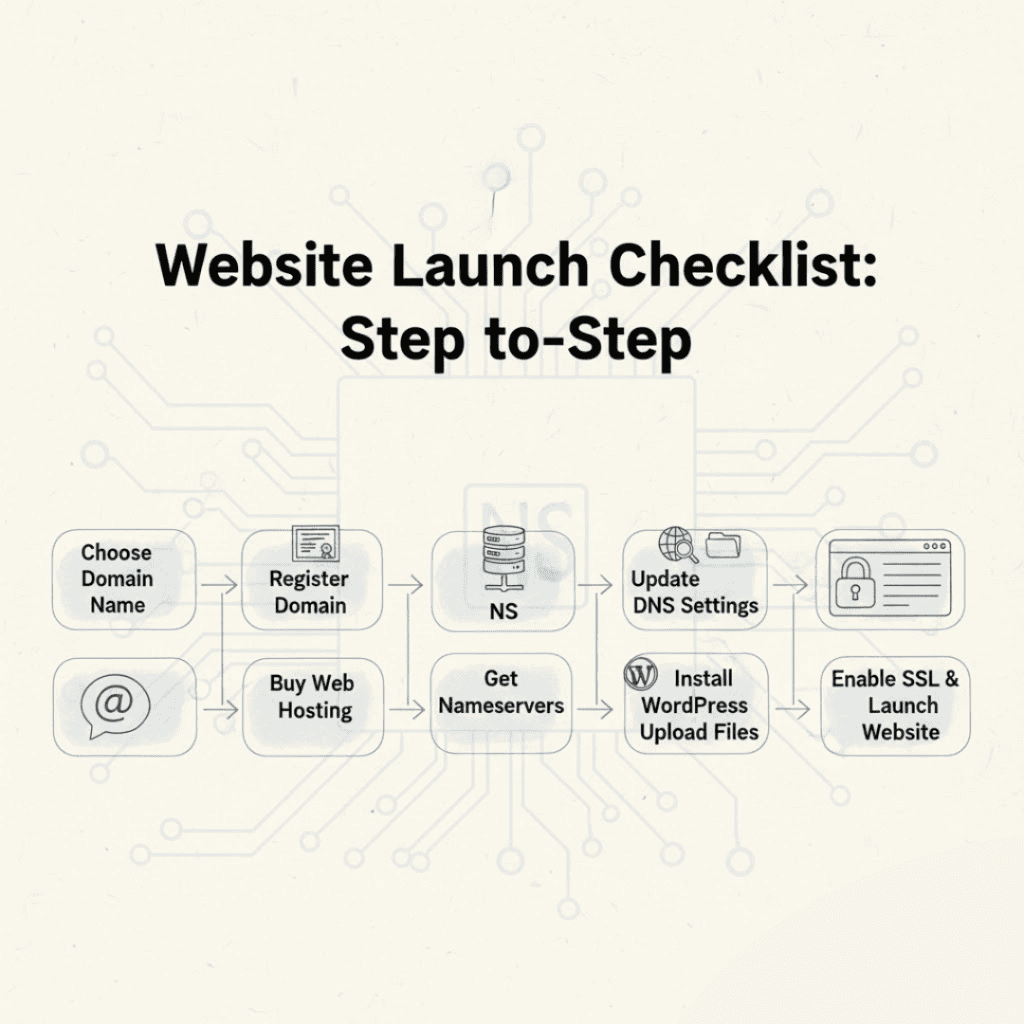
What Does It Mean to Host a Domain?
When you host a domain, you’re essentially taking a domain – let’s say, yourwebsite.com – and pointing it to a web hosting server that has all the files for your site.
- Domain: Your website’s URL
- Hosting, the physical space where your site resides
“Both. You need both. Nor itself.
Step 1: Choose a Domain Name and Register It
Your domain name is your identity on the internet so take a moment to make sure you get it right.
How to Choose a Domain Name
- Keep it short and punchy
- Ignore numbers and dashes
- Choose
.com .in .netextensions like popular - Ensure it’s relevant to your brand or topic
How to Get a Domain Name
- Choose a domain registrar of your choice.
- Find the name you want
- Pick your extension
- Set up your account and pay your invoice
Screenshot idea: Page with a box to see which domain names are available.
Step 2: Get a Plan for Web Hosting
Once you have your domain sorted, you need to choose the right hosting plan.
Different Kinds of Hosting for Beginners
- Shared hosting – Best for Small sites & blogs
- WordPress Hosting – made for WordPress users
- Cloud Hosting – improved scalability and performance
What to Look for in Hosting (2026)
- SSD or NVMe storage
- Free SSL Certificate 99.9% uptime Guarantee
- A simple control panel – cPanel or something as simple
- Genuine support, 24/7
Screenshot Idea: Page with a comparison of hosting plans and features.
Step 3: Look for Your Nameservers
You buy hosting and the hosting company will give you the nameserver info. That is what actually links your domain to the server that is hosting your site.
Example:
ns1-yourhostingprovider-com
ns2-yourhostingprovider-com
You can usually find these in:
- Welcome to your email
- Account information on your dashboard
Screenshot idea: Nameserver info in the hosting control panel.
Step 4: Change the Domain’s Nameservers (DNS Setup)
This is literally the most important step of the whole process.
How to Change Your Nameservers
- Login to your domain registrar account
- Go to Domain Management
- DNS Settings or Nameserver Open
- Nameservers Custom
- Copy your nameservers from your host Save edits
Screenshot idea: DNS settings page with highlighted nameserver fields
DNS propagation time can be anywhere from 5 minutes to 24 hours depending on the case.
Step 5: Add WordPress or Files to Your Website
Now that you’ve hooked up your DNS you can actually upload or install your site.
Option A: Install WordPress (Best Option)
- Login to your host control panel
- WordPress one-click installation
- Choose Domain, Enter Administrator Details
- Click Install.
Option B: Upload Website Files
- Upload all to
public_htmlfolder using FTP or File Manager
WP installation screenshot idea or file manager view.
Step 6: Enable Security and SSL Settings
SSL will be mandatory in 2026. This is important for basic safety and for SEO.
Steps:
- Enable free SSL in your hosting panel.
- Point your site at https
- Create very strong passwords
- Automatic backup
Screenshot idea: dashboard with SSL on.
Step 7: Check Your Website
Read it through quickly before you send it to anyone:
- Open your domain in a browser
- Look for the HTTPS lock icon Mobile test See how quickly it actually loads
If it doesn’t load immediately, it’s probably just DNS still propagating, so give it a bit.
Things to Stay Away From When Hosting a Domain
- Common Mistakes Wrong nameservers
- Merge DNS records from many hosts
- Seriously. You forgot to save your DNS changes
- Skip SSL Upload files outside
public_html
Always double check before you move on – saves you time later.
Conclusion
Hosting a website is truly easier in 2026 than it’s ever been. Get your domain, get a decent host, set up the DNS correctly and you can have a site up and running with no real technical drama.
Take your time, use the screenshots as a guide and double check each setting. Get it right and you have a good, safe, scalable domain hosting platform to build on.
