

Managed WordPress hosting sounds impressive, but it costs noticeably more than a basic shared plan, so it’s fair to ask whether you actually need it. The honest answer depends on your site, your traffic and how much maintenance you want to handle yourself. Many blogs and small business sites run perfectly well on shared hosting. Others lose time, speed or sleep without the extra support. This guide explains what each option includes, where they differ and the signs that it’s time to upgrade. Read on, and you’ll know which one fits your site today and what to watch for tomorrow.
What Is Shared WordPress Hosting?
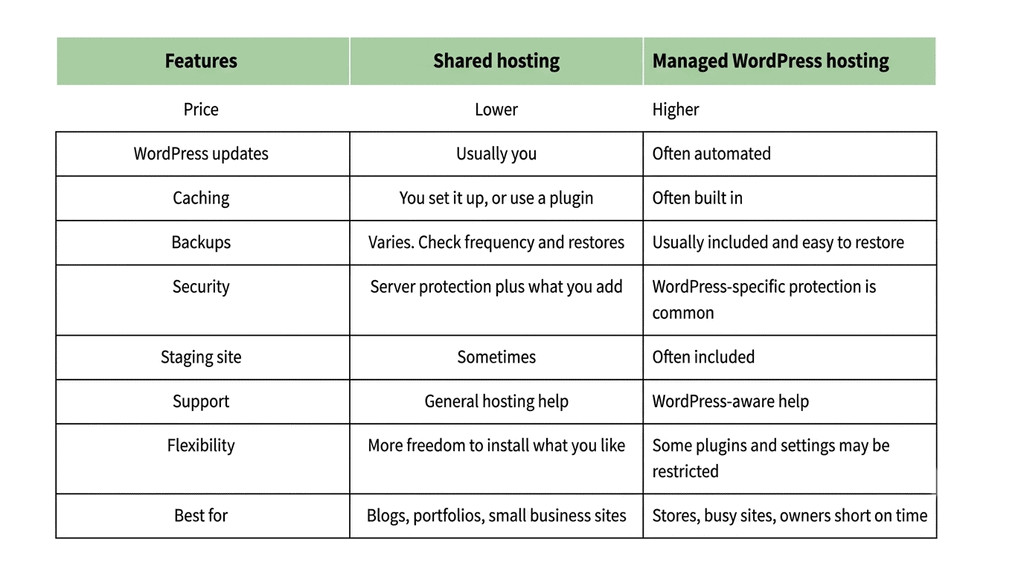
Shared hosting puts many websites on one server, and they all share its CPU, RAM and storage. WordPress runs fine on it. Your host looks after the server itself, but you look after WordPress: updating the core, plugins and themes, setting up caching, checking backups and keeping the site secure. If you want a refresher on the basics, our guide to shared hosting vs VPS hosting explains how shared plans work.
What Is Managed WordPress Hosting?
Managed WordPress hosting is a plan where the host takes on much of the WordPress-specific upkeep for you.
What’s included varies by provider, but it often covers:
- Automatic WordPress and plugin updates
- Server-level caching tuned for WordPress
- Regular backups with simple restores
- Malware scanning and WordPress-focused security rules
- A staging site for testing changes
- Support staff who know WordPress, not just servers
- Performance monitoring
Be careful with the label. “Managed” isn’t a regulated term, and some plans described that way are shared hosting with a few extras. Always check the actual feature list.
Shared vs Managed WordPress Hosting at a Glance
What Managed Hosting Does Not Do
Managed hosting doesn’t fix everything. It won’t:
- Make a bloated theme or heavy page builder fast
- Compress oversized images for you
- Rescue a site with dozens of poorly coded plugins
- Replace good passwords and two-factor authentication
- Write your content or improve your SEO
A slow site on shared hosting can stay slow on managed hosting if the real problem is the site itself. Check the usual suspects first, such as images, plugins, caching and your PHP version. Our guide on how to change PHP version in cPanel covers one quick win.
When Shared Hosting Is Enough
Shared hosting is usually fine if:
- You run a blog, portfolio, brochure or small business site
- Traffic is modest and fairly steady
- The site doesn’t take payments or store sensitive customer data
- You’re comfortable updating WordPress and plugins regularly
- You can follow a simple monthly maintenance routine
- A short slowdown or issue wouldn’t cost you real money
On a decent shared plan with caching and backups, plenty of sites stay there for years.
When Managed WordPress Hosting Is Worth It
Consider managed hosting if:
- You run a WooCommerce store or membership site, where downtime means lost orders
- Your site is central to your business, and problems cost real revenue
- You get traffic spikes from campaigns, sales or press
- You don’t want to handle updates, backups and security yourself
- You manage client sites and want fewer emergencies
- You’ve been hacked before and want stronger protection and quicker recovery
- Your time is worth more than the price difference
For many owners, managed hosting is really paying for time and peace of mind. If you’d spend several hours a month on maintenance, the extra cost can pay for itself.
Signs It’s Time to Move from Shared to Managed
- Your site keeps hitting resource limits, causing slowdowns or errors
- Performance drops during traffic spikes
- You’ve fallen behind on updates and worry about security
- You’ve had security problems or recurring malware
- Your store or booking system must stay up, and you can’t afford surprises
- You’re spending too much time fixing hosting and WordPress issues
- You need staging and easy restores but don’t have them
Before you upgrade, rule out other causes. Poor caching, oversized images and outdated plugins won’t disappear on a new plan. If resource limits are the issue, a managed VPS or cloud plan may be a better fit than managed shared hosting.
Are There Options in Between?
Yes. It isn’t a choice between two extremes:
- Better shared hosting: Plans with caching, LiteSpeed, automatic backups and malware scanning can cover a lot of ground at a lower price.
- Managed VPS or cloud hosting: Dedicated resources with the provider handling server maintenance.
- DIY plus tools: A good shared plan, a reputable caching plugin and a simple monthly routine.
How to Run WordPress Well on Shared Hosting
If you stay on shared hosting, a small routine makes a big difference:
- Weekly: Update WordPress, plugins and themes, and check that your site works
- Weekly or monthly: Confirm backups ran, and download one off the server. Our guide to cPanel backup and restore explains how
- Monthly: Run a malware scan, review user accounts and check SSL expiry
- Always: Use strong passwords and two-factor authentication, and delete unused plugins and themes
Our guides on web hosting security best practices and website hacking prevention cover the details. Set up SSL following our guide to SSL setup in cPanel if you haven’t already.
Questions to Ask a Host About “Managed”
Because the label varies, ask:
- Which updates are automatic: core, plugins, themes?
- How often are backups taken, and can I restore them myself?
- Is malware scanning and removal included?
- Is caching built in, and what does it cover?
- Is there a staging site?
- Are any plugins restricted or banned?
- What does support actually cover? Will they help with WordPress issues?
- Are there traffic, visit or resource limits?
- What happens at renewal?
Our 15-point checklist on what to check before buying web hosting and our WordPress hosting in India buyer’s guide cover more of what to compare.
What About Cost?
Managed plans cost more, but compare like with like. On shared hosting, you may end up paying separately for backups, security tools, premium caching or maintenance help. Add those up before deciding the managed plan is expensive.
Also compare the renewal price, not just the first-term discount, and check whether GST is included in the price shown.
Common Mistakes When Choosing
- Upgrading to fix a site problem that isn’t about hosting. Check plugins, images and caching first.
- Assuming “managed” means everything is handled. Read what’s actually covered.
- Staying on a cheap plan too long when your site now earns money.
- Ignoring plugin restrictions on managed plans if your site relies on specific ones.
- Choosing on the first-year price alone.
- Skipping backups because you assume the host has them.
Not Sure? Start Small and Upgrade Later
For most new sites, starting on a good shared plan and upgrading when you outgrow it is a sensible, low-risk path. Just make sure the upgrade route is easy. Ask whether you can move to a bigger plan without rebuilding your site, and whether migration help is included.
If you want to start with a cPanel-based WordPress plan, explore Cyberin’s hosting plans and check the current details for backups, caching, security, support and renewal pricing. If you outgrow shared hosting later, check what upgrade options are available.
Conclusion
Managed WordPress hosting isn’t something every site needs, and shared hosting isn’t something every site outgrows quickly. If your site is small, steady and low-risk, and you’re willing to handle a little upkeep, shared hosting is enough. If your site earns money, handles customers’ data, sees traffic spikes or simply costs you too much time, managed hosting is worth a serious look. Start with what your site needs today, keep an eye on the warning signs and upgrade when the benefits clearly outweigh the cost.
Frequently Asked Questions
1. What is the difference between managed WordPress hosting and shared hosting?
Shared hosting puts many sites on one server, and you handle most WordPress upkeep. Managed WordPress hosting adds services such as automatic updates, caching, backups, security and WordPress-aware support, usually at a higher price.
2. Is shared hosting good enough for WordPress?
Yes, for many blogs, portfolios and small business sites with modest traffic. It works best when you keep your site updated and backed up.
3. Is managed WordPress hosting worth the extra cost?
It can be, especially for stores, business-critical sites and owners who’d rather not do maintenance. It’s less worthwhile for a small, low-traffic site that you’re happy to look after.
4. Does managed hosting make my site faster?
It can help through built-in caching and tuned servers, but it won’t fix heavy themes, oversized images or too many plugins. Check those first.
5. Is managed WordPress hosting more secure?
It often includes WordPress-specific protection, malware scanning and automatic updates, which can reduce risk. No plan is completely safe, so you still need strong passwords and two-factor authentication.
6. When should I upgrade from shared to managed hosting?
Consider it when your site keeps hitting resource limits, slows down during traffic spikes, handles sales or sensitive data, or takes too much of your time to maintain.
7. Can I move from shared to managed hosting later?
Yes. You can migrate your files, database and email, test the site and then update DNS. Ask your new host what migration help is included.
