

Best WordPress hosting India depends on your budget, management preference and site performance. Compare plans and look for important features such as LiteSpeed caching, automatic backups, staging environments, WordPress updates, storage, CPU & RAM, and tech support.
WordPress pricing varies in terms of price, resource limits, and renewal price. This guide will explain the features and prices to help you find the best WordPress hosting plan for your blog, business website, or WooCommerce store.
1. What Is WordPress Hosting?
WordPress hosting is a web hosting service. It is used to host WordPress sites. It gives you the server environment to host your web files, databases, themes, plugins and other contents.
Some hosts will let you install WordPress with one click on a typical shared host. Some have their own WordPress specific features such as caching tools, staging environments, automatic updates and website management tools.
The biggest difference is the level of WordPress-specific configuration and management that is included in the hosting plan.
2. Shared Hosting vs WordPress-Optimized Hosting
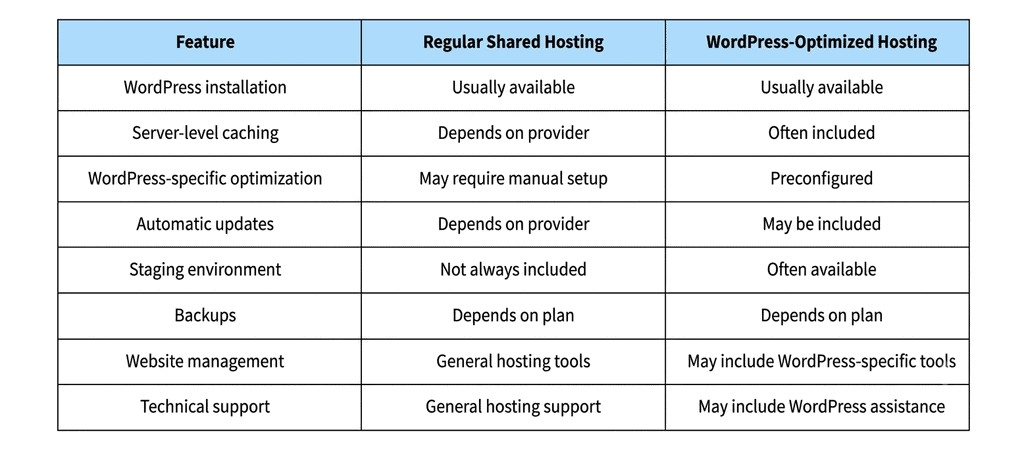
You can host WordPress sites on shared hosting or on WordPress optimised hosting. But the features – what you can manage with them – can differ.
If you are still comparing different hosting options, read our guide on web hosting plans and prices in India to understand the available plans and what to consider before choosing a hosting service.
Which should you choose?
If you want to understand how general-purpose hosting works and compare different hosting options, explore our web hosting plans.
If you want built-in caching, easier website management and staging tools and automated maintenance features then you might want to consider WordPress optimised hosting.
But beware, WordPress optimised hosting can also be on shared infrastructure. Name of the product. Account server resources and limits.
3. Features to Compare Before Buying WordPress Hosting
Not all WordPress hosting plans offer the same set of tools. You decide when you think about it.
Server-Level Caching
Caching saves content that has already been generated for a web page so that the server does not have to do all the work every time the request is made.
Cache is a blessing for WordPress sites because it reduces the load on the server and speeds up page loading .
Check whether your hosting provider offers:
- LiteSpeed Cache or other cache plugin supported
- Cached pages from server
- Gathering (items)
- Cache browser
- CDN Integration
A caching plugin won’t make your site faster by itself. Server configuration, web design, plugins and database queries can also affect load times.
Automatic Backups
Backups are your insurance policy against a bad update, plugin conflict or accidental change.
Compare Contrasting:
- How often it is backed up: daily, weekly or on demand.
- Retention Period Backup retention period.
- Restore Process: Restore yourself or reach out to support.
- Backup Coverage Backups of your website files and databases?
This is especially true if you have a website for your business or a web store that will be constantly updated with content or orders.
Staging Environment
A staging site is a duplicate of your live WordPress website.
You can use it to test:
- New Themes & Plugins
- WordPress Core Update
- Structural changes.
- Customization Programming
- Compatibility issue.
When you are happy that all is working you can push the changes you have been testing to your live site.
Great one click staging. Great if you are always updating your sites or doing maintenance sites for your clients.
Automatic WordPress Updates
WordPress has got a lot of new themes, plug-ins, core software & updates.
Some hosting services update automatically so you don’t have to worry about manual maintenance.
Plan after checking:
- Automatic core update?
- Update theme and plugin support
- Yes, you can schedule updates.
- Backup / Roll-Back Facilities (If Applicable)
Nice to have the automatic updates but you probably want to test out major changes before pushing them out on a business website.
Storage and Resource Limits
The amount of resources you put into your plan will determine how much content your plan can host on your website and how efficiently it can handle incoming traffic.
Here are the specs:
- NVMe Drive or SSD
- Release memory
- CPU Scheduling CPU Scheduling
- Restrictions on the processing of entries
- Inode Limits
- Database limitations.
- Monthly Traffic/Bandwidth Policy
Running a small blog isn’t very expensive. But if you have a site with lots of content, or a membership site, or a woocommerce store, then you’ll need more processing power.
Don’t just choose a plan because it comes with a lot of storage. Performance is also affected by CPU and RAM. WordPress: Account level security constraints The other big question is security on the site.
WordPress Security
Website security is another important consideration.
Look for:
- Free SSL certificates
- Run a virus search
- Firewall protection.
- Security Updates
- Splitting the Account.
- Backup & Recovery
And remember, good WordPress maintenance is not a replacement for host security. Updates of themes and plugins. Strong Passwords. Uninstall any programs you do not use.
Technical Support
Having hosting support is critical especially when your website is having errors and performance issues.
Ask the provider about help with:
- Installing WordPress:
- Site Changes
- Configure SSL.
- Error Database
- does not work with add-ons
- Restore from backup.
- Server Performance Problems
Also check how many hours of support they provide, how responsive are they and if they offer WordPress specific troubleshooting.
4. WordPress Hosting Price in India: What Affects the Cost?
WordPress hosting cost in India depends on your provider, contract tenure, and resources and management services offered. Web hosting isn’t always the great deal it’s cracked up to be.
Before you buy, here are some price considerations:
- Initial subscription price: Take a look at the monthly price listed and the total amount you will pay upfront.
- Renewal Price: The hosting plan renews at a higher price than the initial term. For a better understanding of introductory offers and long-term hosting expenses, read our guide on first-year hosting costs vs renewal prices in India.
- Subscription length Longer subscriptions may require a bigger payment up front but can cut down the effective monthly cost.
- The value of a plan comes down to backups, staging, SSL migration, caching, and so forth.
- Other costs: You will want to add in domain renewals, premium plugins, email services, and other optional tools as well.
When comparing WordPress hosting prices in India, make sure you compare the total cost for the same duration of subscription and do not just go by the monthly promotional rates.
5. WordPress Hosting Plans: How to Choose the Right One
Different types of WordPress sites require different resources and management.
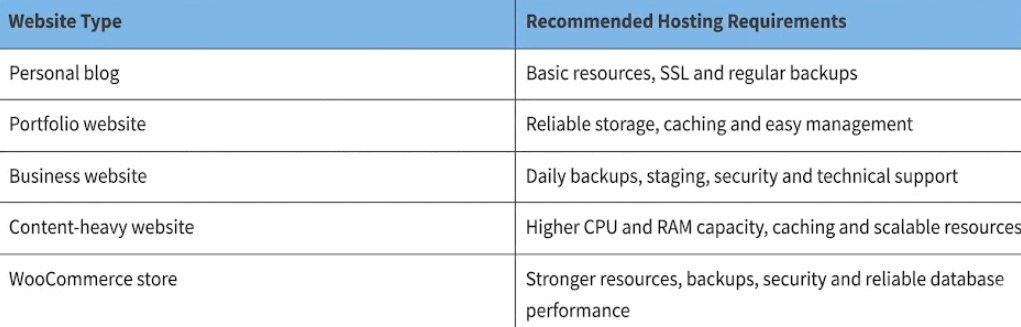
Or perhaps you just need a basic plan for a new site. As your traffic, content and functionality grow you might have to upgrade to a plan that has more resources.
Buy what you need now. Save for an upgrade later.
6. WordPress Hosting Plans and Features: What to Check
Before selecting a provider, compare the actual specifications of its available plans.
Use this checklist:
- Number of WordPress websites supported.
- Storage capacity and storage technology.
- CPU and RAM allocation.
- Server-level caching.
- Daily backups and retention period.
- Staging environment.
- Automatic WordPress updates.
- Free SSL certificates.
- Website migration.
- Database and inode limits.
- Technical support availability.
- Renewal pricing and billing terms.
This comparison helps identify differences between plans without relying only on advertised discounts or promotional claims.
7. When Should You Upgrade Your WordPress Hosting Plan?
If you have a small website with medium traffic your current hosting plan might be just fine.
But, think about upgrading when:
- Your site frequently hits CPU or memory limits.
- Even when you optimise, page loads slow down.
- You are seeing many errors related to resources.
- You get more traffic on your website.
- You install plugins or features that are resource hogs.
- More orders and products for your WooCommerce store.
Before upgrading, check your site performance, plugins, database queries and resource usage. Sometimes performance problems can be solved with optimisation without the cost of a more expensive plan.
8. Explore WordPress Hosting Plans in India
Once you understand your website’s requirements, compare available WordPress hosting plans based on performance, management features, resources and renewal costs.
Cyberin’s WordPress hosting includes features such as:
- LiteSpeed Cache and NVMe SSD storage.
- One-click WordPress installation.
- Staging environment.
- Daily backups with 30-day retention.
- Automatic WordPress, theme and plugin updates.
- Free SSL certificates.
- Website migration.
- WordPress management tools.
The available plans also differ in their included resources and pricing. Review the current plan specifications and renewal terms before selecting one.
Choose a plan according to your website’s resource requirements, maintenance needs and expected growth rather than selecting one based only on its introductory price.
Conclusion
Price per month or storage in your search for wordpress hosting in India. But just how user friendly is your site? It has caching, backups, staging, auto updates, resource limits and tech support.
A simple WordPress site works well on shared hosting. WordPress optimised hosting comes with some extra tools for speed and maintenance.
Before you choose the perfect WordPress hosting package for your needs, take a look at the full details, subscription costs and renewal rates.
Frequently Asked Questions
1. What is the best WordPress hosting in India?
So the best WordPress hosting for you will depend on your needs, budget and traffic. Look for server-side caching, storage, backups, security, resource limits and tech support when choosing a provider.
2. How much does WordPress hosting cost in India?
The cost of WordPress hosting in India varies from one hosting company to the other depending upon the duration and features in the plan. The cheapest plans tend to be the most basic. The more resources and management features you get, the more expensive the plan will be. Also, make sure to check the renewal price before you buy. Forever.
4. Is shared hosting good for WordPress websites?
Yes shared hosting is ideal for personal blogs, portfolio sites and small business websites. However, for sites with high traffic that need resource intensive functionality, plans with higher allowances of CPU, RAM and other resources can come in handy.
5. Which features should I look for in a WordPress hosting plan?
NVMe or SSD. Server caching. Back up regularly. Security features SSL Certs. Free CPU & RAM auto updates staging environments
6. Does WordPress hosting include automatic backups?
Some WordPress hosting plans include the option of auto backups. How often and how long the backup lasts however will vary from provider to provider. Always backup your site files and database. and see that they can be put back on again.
7. Do I need managed WordPress hosting for my website?
Not necessarily. If you’re happy to install, update and optimise WordPress yourself then a simple shared hosting plan might be all you need. If you want a little help with maintaining and managing, managed WordPress hosting is a good idea.
