

AI is changing the face of industry: chatbots, recommendation engines, visual recognition, predictive analytics. But that’s only half the battle in building an AI app. But equally important is choosing the right AI hosting solution to make sure your models run efficiently, scale with demand, and provide fast responses.
AI workloads are generally more intensive on computing power than traditional websites or apps. When you train a machine learning model or host a large language model (LLM) or deploy an AI-powered API, your hosting environment needs to deliver the right mix of performance, storage, security, and scalability.
In this guide we’ll review the hosting requirements of AI applications and compare the best hosting options for developers, startups, researchers and businesses.
What Is AI Hosting?
AI hosting is the infrastructure to run artificial intelligence and machine learning workloads efficiently. AI hosting is not the same as regular web hosting. It gives more processing power, more memory, faster storage and sometimes even dedicated GPU for heavy computations.
Depending on your project, AI hosting can support:
- Machine learning for model training
- Inference APIs for AI
- Virtual assistants and chat bots
- Image and video processing .
- Natural language processing (NLP)
- Recommendation Engines:
- Data analytics and prediction modeling
The best hosting environment depends on whether you are training models or serving predictions, or both.
Key Requirements for AI Hosting
Before choosing a hosting provider you need to find out the hardware and software requirements of your application.
Powerful CPUs or GPUs
AI workloads usually equate to millions, if not billions, of calculations:
- CPUs do fine for light-weight AI applications, APIs and pre-processing.
- GPUs can do many operations at the same time, which speeds up training and inference of deep learning models tremendously.
GPU hosting is needed if you’re working with big neural networks.
Sufficient RAM
Machine learning frameworks load datasets and models into memory (RAM).
If you need more RAM you can do:
- Training Velocity
- Larger datasets
- Better multitasking
- less disk swapping
You can run smaller AI projects with 8-16 GB of RAM but larger models will likely need 32 GB or more.
High-Speed NVMe Storage
AI models can be several gigabytes in size.
Deals on NVMe Ssd Storage:
- Speed up loading of datasets
- Quick model roll out
- Less latency
- Better read/write performance
Accessing data with NVMe drives is a huge step up in speed from traditional SSDs.
Fast Network Connectivity
If your AI app communicates with users over an API, you need low network latency.
Guaranteed Bandwidth:
- Faster responses
- Better User Experience
- Providing a stable model
- Data synchronization the right way
Choosing the Right Hosting Type
The environments where AI projects are hosted are dependent on the project.
Cloud Hosting
Cloud hosting is great for projects that need flexibility.
Benefits are:
- Basic Scaling
- Pay as you go pricing:
- Everywhere available
- Infrastructure as a Service (IaaS)
Cloud can host start-ups, SaaS applications and AI APIs with different workloads.
VPS Hosting
Virtual Private Servers give you dedicated resources for a low price.
Who is VPS hosting good for:
- Mini-AI models
- Development environments.
- Testing of applications
- Individual research projects
Developers get root access and full control of the environment. Here’s a guide on Linux VPS optimization if you want to get the most out of your setup.
Dedicated Servers
Dedicated servers have their own dedicated hardware.
Here are some of the advantages:
- Highest Output
- Consistent workloads
- Good security.
- High capacity storages
- No sharing of resources.
Heavy workloads are often the reason production artificial intelligence systems prefer dedicated hosting.
Understanding GPU Hosting
GPU hosting, optimized for deep learning and machine learning.
GPUs speed up versus CPU-only servers:
- Training deep neural networks
- Computer Graphics
- Natural language processing
- Large language models
- Computer science
GPU hosting is particularly useful if you’re working with frameworks like TensorFlow or PyTorch.
GPU servers cost more, but they can reduce training times from days to hours.
Popular AI Frameworks
Most AI projects are built on popular machine learning frameworks.
TensorFlow
Deep learning, production artificial intelligence and large-scale neural networks are popular in TensorFlow.
PyTorch
PyTorch is flexible and uses dynamic computation graphs, which makes it popular with researchers and developers.
Ollama
Ollama makes it easy to run large language models, locally or on your own private infrastructure. It’s easy for developers to deploy models like Llama and other open source LLMs with little configuration.
When choosing a hosting provider make sure your server is compatible with required OS, python version, CUDA drivers and GPU compatibility of these frameworks.
Deployment Best Practices
AI deployment is more than just uploading a model.
These practices you should follow:
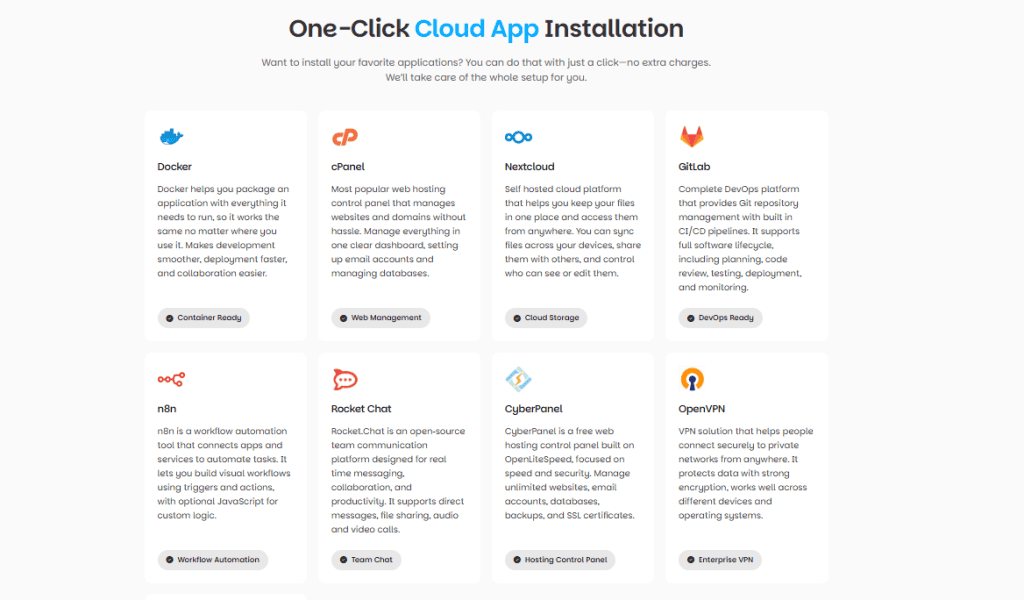
- Use Docker containers for portability Here is a beginner’s guide on Docker hosting.
- Keep training and inference environments separated
- Enable automatic backup
- Monitor CPU, GPU, RAM and storage usage. How to Monitor Performance of Linux Servers
- Update your Python packages
- Use models as APIs
- If heavy traffic, do load balancing.
- Test model performance on a regular basis
Containerization makes it easier to deploy across development, test and production environments.
Security Considerations
AI applications often involve sensitive data.
Protect your infrastructure:
- SSL certificate usage
- Data at Rest Encryption
- Limit API access
- Enable firewalls
- Apply security patches
- Use strong authentication
- Limit permissions for servers
Security has to be considered throughout the entire AI development lifecycle.
Cost Optimization Tips
Without a plan, you could easily burn a lot of money on AI infrastructure.
Reduce costs by:
- GPU servers only if you really need it.
- Automatic scaling of resources.
- Delete unused storage.
- Dataset compression
- Efficient architectures of models.
- Running non-critical training jobs during off peak hours.
Watch your resource usage so you don’t spend money for no reason.
Which AI Hosting Is Best for You?
The best hosting is relative to your project:
Startups
Cloud hosting offers flexibility, quick deployment and scalability as applications scale.
Researchers
Use servers with GPUs to accelerate experiments and reduce training time for complex models.
Developers
VPS hosting is an inexpensive way to learn, test, and deploy lightweight AI applications.
Large Businesses
Dedicated servers or high performance cloud infrastructure can deliver consistent performance for demanding workloads in production artificial intelligence (AI) systems.
Matching Hosting to Your AI Project
Not every AI project needs a GPU cluster. Large-scale model training typically requires specialised cloud platforms or dedicated GPU servers. But many AI projects being built today — APIs, automation tools, chatbots, model dashboards, Ollama deployments, and lightweight inference services — run perfectly well on high-performance VPS or cloud hosting.
For these projects, the hosting requirements are simpler:
- NVMe SSD storage — reduces model loading times and speeds up dataset access
- Scalable VPS resources — lets you add CPU, RAM, or storage as your project grows
- Modern processors — handle inference and API workloads efficiently
- Strong security features — SSL, firewalls, and access controls to protect sensitive data
- Reliable uptime — keeps your AI-powered apps and APIs available when users need them
- Compatible infrastructure — supports the OS, Python version, and CUDA drivers your framework needs
If you’re building AI-powered web apps, development environments, APIs, or machine learning projects that don’t require dedicated GPU hardware, a well-configured VPS or cloud plan is often enough — and considerably cheaper than GPU-dedicated infrastructure.
What to check before choosing: Does the plan include NVMe storage? Can you scale resources without downtime? Does the provider support the frameworks you’re using (TensorFlow, PyTorch, Ollama)? And does the plan include the security features your project needs?
Conclusion
The right AI hosting solution can make or break your application’s performance, reliability, and ability to scale in the future. If you train machine learning algorithms, serve AI APIs or deploy large language models, your infrastructure should have the right combination of processing power, storage, memory and security.
Knowing your workload helps you choose the right hosting for your needs, and build AI apps that run well today and are prepped for tomorrow’s growth.
If you want to go deeper, here are a few guides worth reading next: How to host a Python Django application on a VPS server
Frequently Asked Questions
Do I need a GPU for AI hosting?
Not necessarily. Light AI apps, APIs and pre-processing can run on CPUs. GPUs are necessary for training deep learning models and for running large language models
How much RAM do I need for machine learning?
8-16GB is fine for smaller projects. 32 GB or more is often required for larger models and data sets . Before you choose a plan, see what your framework requires.
Is NVMe storage necessary for AI workloads?
Not required but a huge plus. AI models are big, data sets are big and NVMe reduces loading times.
Can I run AI projects on a VPS?
Yes, for small models and dev environments. But if you want to train big models, or run production AI APIs, you will probably need a dedicated server or cloud infrastructure with GPUs.
What’s the difference between training and inference hosting?
(training is typically more computationally expensive, on GPUs). Inference (for predictions) can be done on CPUs or smaller GPUs depending on the model .
Which frameworks work on most hosting providers?
Most modern Linux machines will run TensorFlow, PyTorch and Ollama. Make sure your provider has the OS, Python version, CUDA drivers and GPU support you need.
How do I keep AI hosting costs down?
Turn on auto-scaling , get rid of unused storage , compress datasets , and schedule non-critical training jobs during off-peak hours . Use GPUs only when needed .