

Spend any time around developers lately, and you’ve probably heard someone mention Docker — usually right before they explain how it saved them from some deployment nightmare. There’s a real reason it comes up so often. Docker’s become one of the most widely used technologies for deploying modern applications, and understanding how it actually works, and where to host it, is genuinely worth your time if you’re building anything past a simple static site.
What Is Docker, Actually?
Docker packages an application — code, dependencies, system libraries, configuration, the whole environment it needs — into a single unit called a container. That container runs consistently no matter where you put it: your laptop, a colleague’s machine, a production server sitting halfway around the world.
The classic pitch is “works on my machine” finally becoming a non-issue. If it runs in the container on your laptop, it runs identically on the server, because you’re not just shipping code anymore — you’re shipping the entire environment that code depends on to actually work.
How Containerization Actually Works
This is where Docker genuinely diverges from older approaches like virtual machines.
A virtual machine virtualizes an entire operating system — kernel included — sitting on top of your host hardware. Each VM is heavy, slow to boot, and eats significant memory and CPU just existing before it does any real work.
A container, on the other hand, shares the host machine’s OS kernel but isolates the application’s processes, filesystem, and network from everything else running alongside it. Containers are dramatically lighter as a result — they start in seconds, not minutes, and you can pack a lot more of them onto the same hardware without breaking a sweat.
| Factor | Docker Containers | Virtual Machines |
|---|---|---|
| Startup time | Seconds | Minutes |
| Resource usage | Lightweight | Heavy — full OS per instance |
| Isolation | Process-level | Full OS-level |
| Portability | Highly portable | Less portable |
| Density per server | Many containers | Few VMs |
Neither one’s universally “better,” honestly. VMs still make sense when you genuinely need full OS-level isolation, or you’re running different operating systems side by side. Docker wins when speed, efficiency, and consistency across environments matter more.
Docker’s Core Architecture
A handful of terms worth actually understanding before going further:
- Docker Engine — the core software that builds and runs containers on your machine or server
- Image — a read-only template holding your application and its dependencies; think of it as the blueprint
- Container — a running instance of that image; this is the actual live, working application
- Dockerfile — a text file listing instructions for building an image, step by step
- Docker Hub — a public registry where pre-built images (databases, web servers, language runtimes) live, ready to grab
Installing Docker: The Basics
On a Linux VPS — the most common setup for Docker hosting — installation generally looks something like this:
bash
# Update package index
sudo apt update

# Install Docker
sudo apt install docker.io -y

# Start and enable Docker
sudo systemctl start docker
sudo systemctl enable docker

# Verify installation
docker --version
Once it’s running, pulling an existing image and launching a container takes just a couple of commands:
bash
docker pull nginx
docker run -d -p 80:80 nginx
That grabs the official Nginx web server image and runs it, mapping port 80 on your server to port 80 inside the container — a working web server, live, in under a minute.
What You Actually Need to Host Docker
Docker doesn’t demand exotic infrastructure, but a few things genuinely matter here.
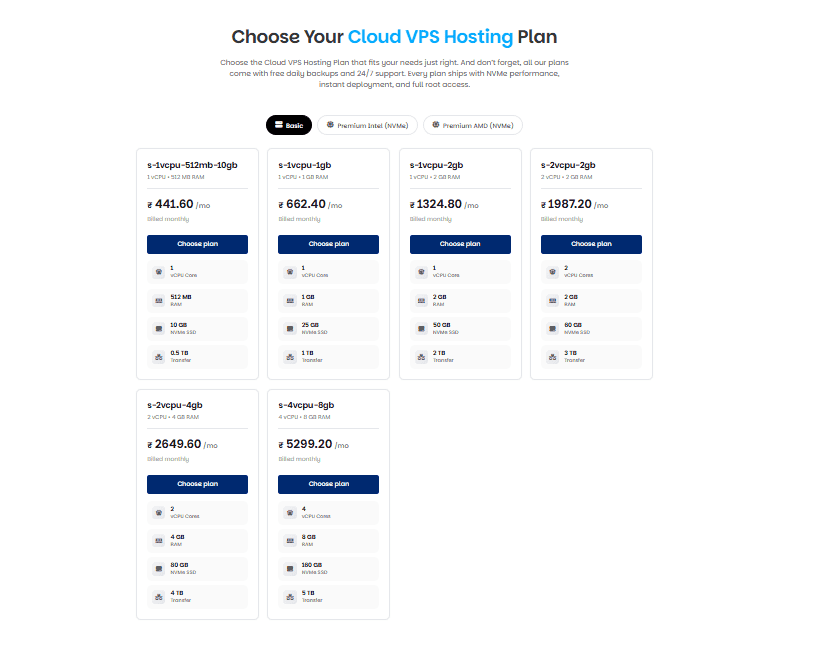
You need a Linux-based VPS or cloud server — Docker runs natively on Linux, which is exactly why most Docker hosting happens there rather than on Windows-based plans. RAM and CPU needs depend entirely on how many containers you’re running and how hungry your application actually is. SSD or NVMe storage genuinely helps too, since container images and volumes benefit from fast disk I/O once you’re under real traffic. And you’ll need root or sudo access — no way around it, which is really why Docker fits VPS hosting so much better than typical shared hosting does.
A Practical Deployment Example
Say you’re deploying a simple Node.js app on a Linux VPS. Here’s roughly how that plays out.
First, write a Dockerfile:
dockerfile
FROM node:18
WORKDIR /app
COPY package*.json ./
RUN npm install
COPY . .
EXPOSE 3000
CMD ["node", "app.js"]
Then build the image:
bash
docker build -t my-node-app .And run the container:
bash
docker run -d -p 3000:3000 my-node-appYour application’s now running inside its own isolated container, reachable on port 3000. Need to run multiple services together — your app plus a database, say? That’s where docker-compose comes in, letting you define and launch several containers together through a single configuration file, with just one command: docker-compose up -d.
Security Practices Genuinely Worth Following
Containers add real convenience, but don’t mistake that for automatic security — they’re not locked down by default.
Keep your base images updated; an outdated image can quietly carry known vulnerabilities you never checked for. Avoid running containers as the root user wherever you can help it. Only pull images from sources you actually trust — official Docker Hub images, or ones you’ve built yourself. Limit container resource usage too, so one compromised or runaway container doesn’t drag down everything else sharing the server. And keep secrets — API keys, passwords — out of your Dockerfile entirely; use environment variables or a proper secrets manager instead. Worth pairing all of this with broader hosting security practices too, since container security is really just one layer of the whole picture.
Common Use Cases
Docker shows up constantly in real-world deployment, and it’s not hard to see why once you’ve used it. Microservices architectures lean on it heavily, with each service living in its own container. Teams use it to keep development environments consistent across everyone’s machine, sidestepping the classic “works fine on my laptop” problem. CI/CD pipelines depend on it for repeatable, reliable environments during automated testing and deployment. And scaling web applications under load often just means spinning up more container instances rather than provisioning entirely new servers.
Docker vs. Virtual Machines: The Real Takeaway
Reach for Docker when fast deployment, efficient resource use, and consistency across environments actually matter to what you’re building. Reach for a full VM instead when you need complete OS isolation, you’re running legacy software tied to a specific OS, or you genuinely need different operating systems running side by side on the same hardware.
Plenty of real setups actually use both together — VMs handling infrastructure-level isolation, with Docker containers running inside them for application-level deployment on top.
Frequently Asked Questions
Do I need a powerful server to run Docker? Not really. Docker’s lightweight nature means even a modest VPS can run several containers comfortably, depending on what those containers are actually doing day to day.
Can I run Docker on shared hosting? Generally, no. Docker needs root-level access that typical shared hosting environments simply don’t provide. A VPS or dedicated server is really the realistic starting point here.
Is Docker free to use? Yes — Docker Engine itself is free and open-source. Docker Hub offers free image hosting with some limits on private repositories, and paid tiers exist if a team needs more than that.
How is Docker different from Kubernetes? Docker builds and runs individual containers. Kubernetes orchestrates a lot of containers across multiple servers at once — scaling, load balancing, managing everything at scale. Most teams start with Docker and pick up Kubernetes later, once managing containers by hand genuinely becomes impractical.
Will Docker work on any Linux VPS? Yes, as long as the VPS runs a reasonably current Linux distribution and you’ve got root access to actually install it.
Conclusion
Docker’s popularity isn’t hype — it genuinely solves a real, persistent problem: getting applications to run consistently from development all the way through to production. For hosting, that mostly means a Linux VPS with enough resources for your workload and root access to actually configure things the way you need. Start small — one container, one application — and build out from there once the fundamentals feel genuinely comfortable.