

Moving your website to a new host sounds like a bigger deal than it usually is. If you’ve never done it before, sure, it’s a little intimidating — but with some basic prep, this genuinely comes down to a handful of steps, not some multi-day ordeal.
This guide walks through what moving to a new hosting provider actually looks like — what to sort out beforehand, and what to double-check once you’re done. Whether you’re running a small business site, a blog, or an online store, knowing this ahead of time saves you from the usual headaches: a missing file here, a database error there, email that mysteriously stops working, DNS that’s pointed at the wrong place.
Why People Even Bother Switching Hosts
Honestly, it’s rarely just one thing. Slow load times, a server that keeps falling over, prices creeping up every renewal, a feature you needed that was never there, support that takes three days to reply to a “my site is down” ticket — any one of these is annoying enough on its own.
Before you jump to a new host, it’s worth actually comparing:
- Storage and bandwidth you’re getting
- How the server and site actually perform
- Real uptime and reliability, not just the number on the pricing page
- What backup options exist
- Security features included
- What support actually looks like
- The control panel you’ll be using day to day
- What you’ll pay at renewal, not just at signup
- Whether your current software/apps will even work on the new setup
If you have a provider on your shortlist, review its plans to make sure the selected configuration covers your current and expected requirements.
First, Check What You’re Actually Getting Resource-Wise
A website’s performance depends on more than just “the hosting” — server resources, storage tech, your own code, plugins, themes, databases, how much traffic you get. All of it plays a part.
When you’re comparing plans, look past the marketing copy and check:
- What kind of storage, and how much
- CPU and memory limits
- Bandwidth caps, if any
- How fast the server actually responds
- Caching setup
- Any hard resource ceilings
NVMe SSD storage, for what it’s worth, is generally faster than older spinning-disk storage — but that alone won’t save a poorly optimized site. Speed is a team effort between your hosting and your actual website.
Then Look at Uptime — Actually Look, Don’t Just Trust the Number
Uptime matters for the obvious reason: your site needs to be there when someone visits it. But don’t just nod along at “99.9% uptime” on a pricing page — dig into what the guarantee actually covers, what the service terms say, how monitoring works, and whether there are exclusions tucked away somewhere.
Your own use case matters here too. A personal blog can tolerate a rare hiccup. A store taking orders around the clock really can’t.
Security and Backups Deserve a Real Look
Security setups vary more between hosts than people expect. Before you migrate anywhere, check whether the new plan actually includes:
- SSL certificates
- A firewall
- Malware scanning
- DDoS protection
- Automated backups
- Proper account access controls
And regardless of what the new host promises — keep your own backup of your files and database before you touch anything. This is the one step nobody regrets taking.
Find Out If You’ll Get Help Moving
A full migration usually means shuffling over files, a database, email accounts, and a pile of configuration settings all at once. Some hosts will do a chunk of this for you; others just hand you a guide and wish you luck.
Worth checking upfront whether your chosen hosting plan includes migration assistance and what types of migrations it covers.
Pick a Plan That Actually Fits, Not Just the Cheapest One
A basic blog and a growing online store have very different needs. Shared hosting is fine for the former; the latter is going to want more CPU, RAM, and storage sooner than you’d think.
Before settling on a plan, think through:
- How much traffic you’re actually getting
- What you need storage-wise
- Where that traffic is headed in the next few months
- Whatever CMS or app your site runs on
- Database requirements
- Any resource limits attached to the plan
- The control panel and features you’d actually use
Going with the cheapest option just because it’s cheapest tends to bite people later.
Before You Actually Start
Get these ready first:
- Login details for your current hosting account
- A backup of your website files and database
- Login details for your new hosting account
- Access to your DNS or domain control panel
Once you’ve got all four, you’re good to go.
The Actual Move, Step by Step
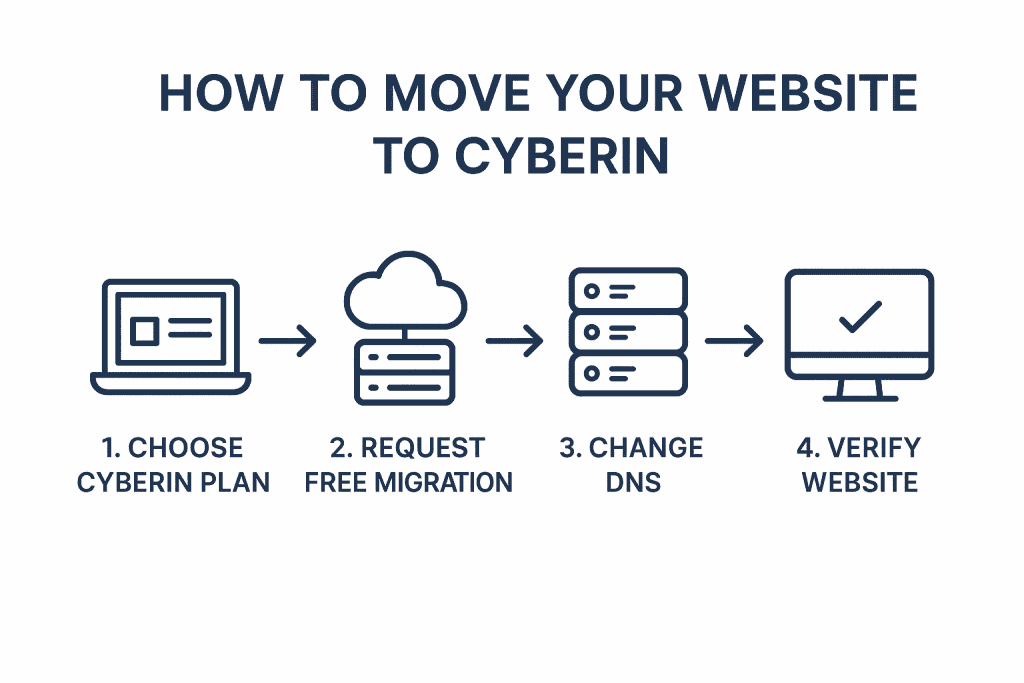
Pick your plan. Choose a plan that matches your site’s requirements — shared hosting for lighter sites, cloud or VPS hosting for higher resource needs, or specialized hosting where appropriate.
See what migration help is on offer. If your plan includes it, open a support ticket and give them the details on your current setup. From there, they’ll usually walk you through the transfer.
Update your DNS. Once you’ve confirmed everything works on the new hosting, point your domain’s nameservers to the new hosting provider. This is the step that actually sends visitors to your new server instead of the old one.
Check absolutely everything works. Once DNS has propagated (give it a few hours), go through: your main pages and navigation, images and media, contact forms, login and account features, anything database-driven, and email if it’s tied to your domain. If something’s broken, that’s what support is there for.
What You Actually Gain From Switching
If your old host genuinely wasn’t cutting it, a move can pay off — more server headroom, updated infrastructure, better security and backup options, a control panel that doesn’t fight you, room to grow into a bigger plan later, and support that actually responds. What you specifically get depends on the plan you choose, so don’t expect every benefit to apply equally to every setup.
Wrapping Up
Moving to a new host really doesn’t have to be the ordeal people build it up to be in their heads. Back up your site, gather your login details, and make sure whatever provider you’re considering can genuinely handle what your site needs. Test everything — pages, forms, images, databases, email — both before and after you flip the DNS switch. Before choosing a provider, review its plans and migration options first, so you land on a setup that actually fits your website rather than one that simply looks suitable at first glance.