


A high traffic website has its own share of problems but is lots of fun. High traffic website hosting needs to be able to handle surges in traffic, keep pages loading fast and scale gracefully as more visitors come to the site. In this article we’ll discuss how to handle heavy traffic loads safely and keep your site running smoothly and trouble free.
What High-Traffic Hosting Is
If a website receives high traffic, whether for a short or long period of time, it will need hosting that can handle the traffic. This includes news websites, streaming services, online stores during major sales and popular blogs. This can lead to slow loading times or even sites going offline as regular shared hosting usually can’t handle this much traffic. You want to pick a hosting plan that can handle more traffic when it comes so that your users have a good experience. Choose the best web hosting provider in India to keep your site fast, reliable and traffic-ready as your audience grows.
Websites with a Lot of Traffic Have Big Problems
Technical problems are rampant on popular sites:
Server Overload
If too many people are using the server at the same time it can run out of resources.
Slow Page Load Times
If your website gets a lot of traffic, it can make your site slow, and that can cause more people to leave.
Risks of Downtime
If your server cannot cope with a lot of traffic at once, your site may go down, which can hurt your sales and reputation.
Data Management
If you have a lot of traffic to your site you need a good database to support a lot of users at the same time.
Load Balancing: Make Sure Traffic Is Spread Out Well
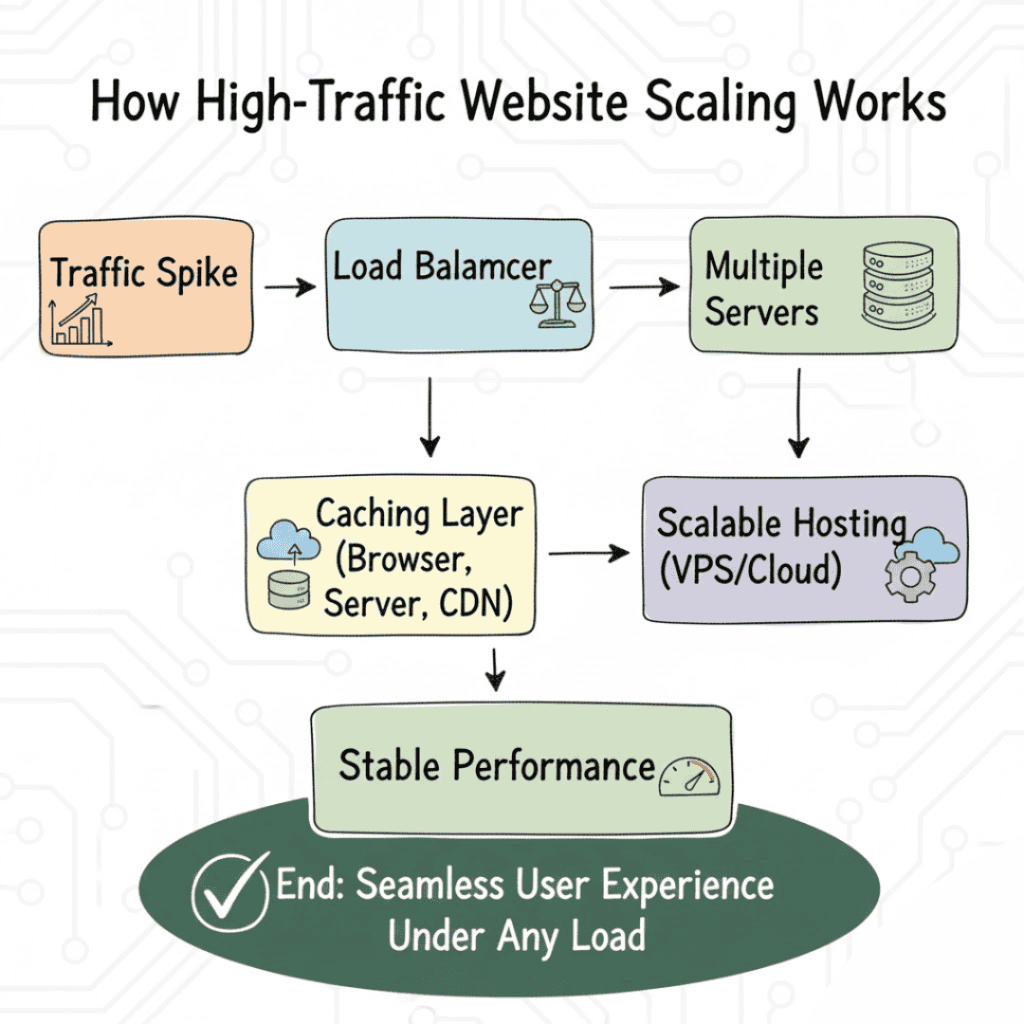
Load balancing is one of the best ways to handle large amounts of traffic at once. Load balancers distribute incoming traffic to multiple servers so that one server is not overwhelmed with traffic . This means that your website will remain responsive even when there is a sudden spike in traffic.
Types of Load Balancing
Round Robin : Distributes the traffic evenly on all the servers.
Least Connections – Send the new visitor to the server with the fewest connections.
IP Hashing : Visitors are always sent to the same server depending on their IP address.
Load balancing helps your system remain responsive and available when many people try to use it at the same time.
Caching: Speed Up Your Website
Caching is also a useful tool for sites with lots of traffic. So it stores the common data in a temporary place so that it can be sent to the users in an efficient manner without asking the server again and again.
Different Kinds of Caching
Browser Caching: Stores pieces of a website in the visitor’s browser. So when they come back again it loads quicker.
Server-Side Caching Caching of dynamic generated server pages or database queries.
Content Delivery Network ( CDN ) : Delivers static files ( images, CSS, JavaScript etc ) to servers around the world . This means faster loaded pages for users.
Caching improves the website load time and decreases the load on the server. This is very important when you have heavy traffic.
Going from Shared Hosting to VPS or Cloud Hosting
Most high-traffic websites will outgrow shared hosting at some point. VPS or cloud hosting offers you more resources, better performance and room to grow:
VPS Hosting: You get your own dedicated resources on a shared server, so you have more control and stability. It is ideal for sites with high traffic.
Cloud Hosting: Very flexible you can add or remove resources to whatever you need Cloud hosting is a good option if your website has unpredictable traffic as it can scale up to handle spikes easily
How to Get Better Without Taking Time Off
- Do upgrades when traffic is low so users are not that upset.
- Testing the new setup in staging before we go to production.
- If you’re moving, use load balancers or DNS failover to reroute traffic.
- Back up Back up Back-up. If it all goes wrong
Watching Things and Making Them Better
You have to watch a high-traffic website all the time to keep it running:
- Use Google PageSpeed Insights or GTmetrix to check the loading speed.
- Check cpu usage, memory, bandwidth etc of your server.
- Image optimization . Compression of files. Minify scripts: Reduces server load.
- Keep your plugins, software and security patches updated to avoid slowdowns or security holes.
Conclusion
To safely scale a high traffic website, you need the right mix of hosting, load balancing, caching and proactive monitoring solution. This usually means moving from shared hosting to VPS or cloud hosting and employing intelligent caching techniques and load balancers to evenly distribute the traffic. Follow these steps you can keep your site online , fast and reliable all the time. If you do the right tactics then your website can easily grow and handle higher levels of traffic without any problems for your visitors.
