

WordPress is the backbone for over 43% of all websites. That ain’t a few. It’s flexible, easy to start with and has a plugin for just about anything – which is exactly why it’s suitable for everyone from solo bloggers to big businesses.
But good WordPress performance is more than just the CMS. You need a good control panel to manage server setup, security, routine management and backups. If you don’t, you’re either paying someone to run your server, or you’re spending your weekends in a terminal.
In this guide, we’ll take you through the major control panel options for WordPress hosting – what each one does well, what it falls short on and what really matters when picking one, especially if you’re hosting in India.
What Is a WordPress Control Panel?
A WordPress control panel is a dashboard that allows you to run your WordPress site without having to learn a ton of technical stuff.
This usually means:
- Easily install WordPress.
- Handling of Email Accounts and Domains
- Track Server Performance and Traffic
- Backup & Restore Settings
- Hardening the site against known threats
A good control panel makes managing your server an easy task, and takes the scary out of it. Speed and security is really improved with the right panel for most WordPress users.
A Quick Note on “Best”
Before we go any further – there is no one “best” control panel here. It is contingent upon what you are running, your budget and your technical comfort.
What works for a single blogger won’t work for an agency managing 50 client sites. You can’t run on dedicated server what you can run on 5$ VPS. So, putting rankings aside, here’s a down-to-earth look at the main options.
Popular WordPress Control Panels
1. cPanel
cPanel is one of the most popular control panels in hosting. Its dashboard controls websites, databases and email through an easy interface that has made it a favorite among novice and veteran users.
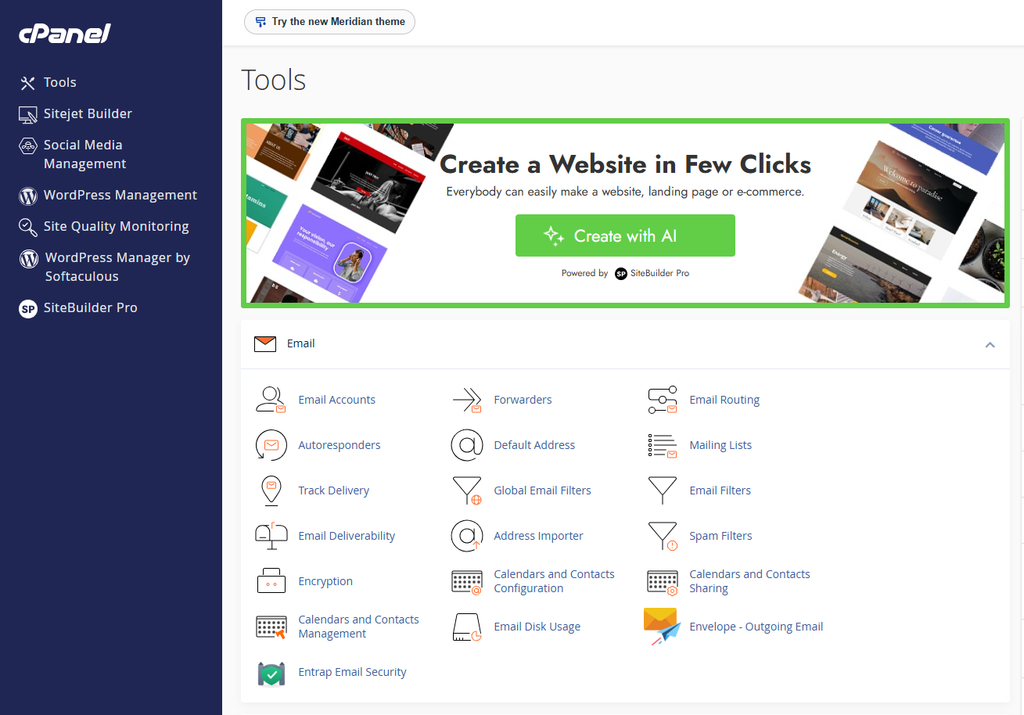
WordPress installs with one click and has automatic backups, one-click SSL and easy file management. The ecosystem is massive – there are thousands of tutorials, plugins and integrations because cPanel has been around for so long.
Things to know before you get this:
- Paid panel – licensing is about $26/mo depending on number of accounts.
- Uses more server resources than lighter alternatives
- The interface might seem a little dated compared with newer options.
Great for: people who want stability, compatibility, and tons of docs.
2. Plesk
Plesk is a clean, modern panel that works across operating systems – a real plus for agencies that have to juggle mixed Linux and Windows environments.
Its most known product is the WordPress Toolkit, which lets you manage, clone and stage multiple WordPress sites from a single dashboard. It also includes tools to help shield you from malware and unauthorized access.
Things to know before you choose it:
- Paid option – licensing fees vary depending on features and number of domains
- Can use more server resources .
- Prices can differ greatly from plan to plan
Best For: Agencies and developers working across multiple WordPress sites on different environments.
3. CyberPanel
CyberPanel is a free and open source panel that runs on LiteSpeed technology. That’s why it’s a popular choice for WordPress sites looking to improve load times – LiteSpeed is generally faster than Apache for WordPress workloads.
It has one-click WordPress install, SSL management, automatic backups, staging environments.
Things to know before you choose it:
- Installation may require more technical comfort than a paid panel with dedicated support.
- The enterprise version paid offers some advanced features.
- Less community than cPanel
Best for: Performance-minded users who don’t mind a little learning curve.
4. DirectAdmin
DirectAdmin is a cheaper, lighter cPanel alternative. It covers the core essentials – DNS, email, domains, databases and backups – without the resource overhead.
This is a good option for smaller WordPress installs or on a budget.
What to know before picking it up:
- Less extensive plugin ecosystem and community than cPanel
- Interface is working but less smooth
- Less integrations with third party tools
Best for: Anyone looking for a simple, low-cost paid panel.
5. CloudPanel
CloudPanel is a newer, lightweight panel built specifically for cloud environments such as AWS, DigitalOcean or Google Cloud. It works great with Nginx and PHP so it’s great for fast web apps.
Things to know before you buy it:
- use free of charge
- No built-in email hosting – you’ll have to find a separate solution
- Not a traditional VPS, optimized for the cloud
Best for: Developers who run WordPress on cloud infrastructure and don’t need email hosting.
Other Panels Worth Knowing About
In addition to the five above, a few others come up regularly:
Webmin/Virtualmin — Old, free, flexible. The interface is dated but once you get used to it it is powerful.
VestaCP – free & simple, but development has slowed down in recent years.
ISPConfig – Free, open source, multi-server. Best suited for experienced administrators.
AAPanel – Free, easy to use, popular for its clean interface and one click installs.
Each has disadvantages. There is no “best” out there.
Why Control Panels Matter for WordPress
The type of panel you choose will greatly affect how fast, secure and reliable your site will be on a day-to-day basis.
Performance. A good panel helps you to manage the server resources efficiently and that means faster page loads. LiteSpeed-based panels are usually designed to reduce server load and handle traffic spikes better than some heavier alternatives. If performance is your priority, it’s worth understanding how control panels affect website speed.
Safety. WordPress sites are a frequent target of attacks. Control panels are great because they allow you to configure firewalls, SSL certificates, access control, malware scans etc. without having to edit server config files directly. If you’re running a panel, it’s worth reading up on control panel security best practices.
Manageability No control panel can be time consuming because you will have to take care of things like updating WordPress core, installing plugins, running backups and managing databases manually. These, and the right panel, are quick, routine jobs – so you can focus on the site itself, not on keeping the server up.
Key Features to Look for in a WordPress Control Panel
Regardless of what panel you’re looking at, these are worth a look:
- One-Click Installs – Quick & Simple WordPress Installation
- Automatic Backups – Easy Restore, Not Just a Backup
- Staging environments for safely testing updates before they go live.
- Install and renew easy ssl management
- Resource monitoring – gain insight into CPU, RAM and bandwidth consumption
- Security tools – firewalls, malware scanning, login protection
What to Look for If You’re Hosting in India
If you’re targeting an audience in India, there are a few other things to keep in mind with the panel itself.
Server Location – Indian data centers generally mean lower latency for local visitors. For Indian audiences, a server in Mumbai or Bangalore is likely to perform better than a US or European server.
Local help— Our support hours are in line with IST, and our team has knowledge of local payment methods and compliance requirements.
Infrastructure compatibility—Some panels are better for certain hosting setups. For instance, a LiteSpeed based panel will gain more from LiteSpeed optimized hosting than a generic Apache setup. “Don’t build the infrastructure around the panel, align the panel with the infrastructure.”
Common Mistakes When Choosing a Panel
Simply on price. Not really free if you have to spend 10 hours to set up a panel.
Ignoring resource consumption. Heavy panels like cPanel need more cpu and ram. That’s important on a small VPS.
No compatibility checking. Some panels work better with some web servers (Nginx, LiteSpeed, Apache). Match the panel to your pile.
No trial. Most paid panels have demonstrations. Before marriage, use them.
No migration. Switching between panels isn’t always easy. I thought so.
Frequently Asked Questions
Is cPanel worth the cost?
Yes, if you care about reliability, broad compatibility, and lots of documentation. If you’re cool with the technical setup, free alternatives can be just as good.
Which free control panel is best for WordPress?
Depends what you need. CyberPanel is performing very well. CloudPanel is awesome for cloud servers Webmin is old but flexible. No single winner.
Can I switch panels later?
Yes. But migrations are tricky. Some panels have built-in migration tools. Others have to be done manually.
Do I need a control panel at all?
Not really, no. If you are comfortable working on the command line, you don’t need to work with a WordPress site. But for most users a panel will save time and create fewer errors.
Which panel is easiest for beginners?
cPanel and Plesk are considered to be the easiest to learn for newbies but they are paid. CyberPanel and AAPanel are much easier to use than other free alternatives.
Do free panels lack security?
No. Regular security updates are provided for free panels such as CyberPanel and CloudPanel.
The trade-off is usually support and extra features, not core security.
Conclusion
A good WordPress dashboard is no longer a choice. Whether you have a personal blog, an online store or a business website, the right panel will make your site faster, easier to manage and more secure.
cPanel is still the tried and true paid standard with good docs. Plesk is great for multi-platform environments. CyberPanel is a strong, performance-oriented free option. DirectAdmin and CloudPanel are more niche budget or cloud native products.
There isn’t a clear winner here – the best option will depend on your technical ability, budget and what your WordPress site actually needs. Look at the features that matter the most to you and then decide.