

The best web hosting provider in India gives you fast servers, reliable uptime, and transparent pricing. Cyberin offers NVMe storage, LiteSpeed servers, and India-based data centers. This guide shows you how to choose the right plan for your website.
Step 1: Assess Your Website’s Needs
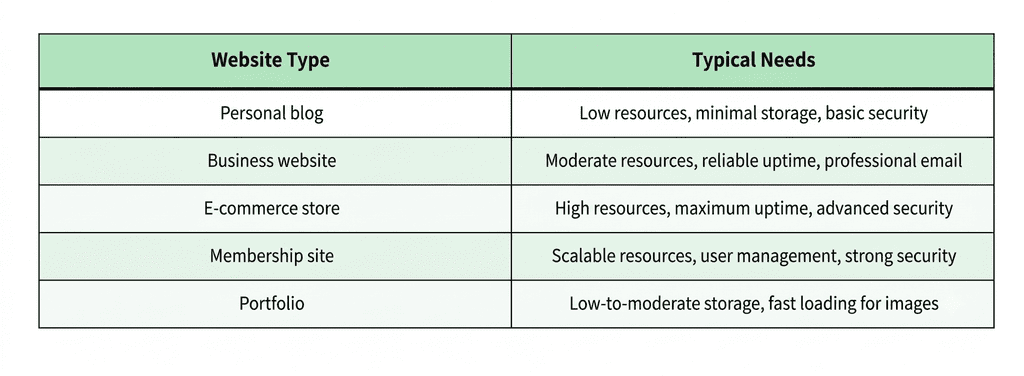
Before comparing plans, understand what your website actually requires.
Expected Traffic
Estimate your monthly visitors. A new blog might get 1,000 visitors per month. A growing business site might get 10,000. An e-commerce store during a sale could get 50,000 in a single day.
Rule of thumb: Choose a plan that can handle at least 50% more traffic than you currently expect. This gives you room to grow without immediate upgrades.
Storage Needs
Calculate your storage requirements:
- Average web page: 2 MB
- Average image: 200 KB – 1 MB
- Average video: 10 MB – 100 MB
- Database (WordPress): 50 MB – 500 MB
A small blog might need 5 GB. A growing site with media files might need 20 GB. An e-commerce store with thousands of product images might need 50 GB or more.
Technical Requirements
- CMS or platform: WordPress, custom code, website builder?
- Programming languages: PHP, Node.js, Python?
- Database: MySQL, PostgreSQL, MongoDB?
- Special needs: Email hosting, SSL, CDN, staging environment?
Step 2: Understand Hosting Types
Different hosting types suit different needs.
Shared Hosting
Your website shares a server with many other websites. Resources are divided among all users.
Best for: Beginners, personal blogs, small websites with low traffic.
Pros: Lowest cost, easy setup, managed by the host.
Cons: Limited resources, potential slowdowns from “noisy neighbors,” less control.
VPS Hosting
A Virtual Private Server gives you a dedicated portion of a server. Resources are isolated from other users.
Best for: Growing websites, developers, businesses with moderate-to-high traffic.
Pros: Dedicated resources, more control, better performance.
Cons: Higher cost, requires some technical knowledge.
Cloud Hosting
Your website is actually on a network of connected servers , not a single machine . Resources scale automatically.
Best for: Businesses with varying traffic, e-commerce shops, high uptime requirements.
Pros: The Good Great scalability, high uptime, pay-as-you-grow pricing.
Cons: It can be difficult to manage and the costs can skyrocket if you use it a lot .
WordPress Hosting
Optimised for WordPress. It includes automatic updates, caching and security hardening.
Best for: Bloggers, businesses, anyone who uses WordPress.
Pros: Optimised for performance, supports WordPress, updates automatically.
Cons: WordPress-only, can be pricier than generic shared hosting.
cPanel Hosting
Shared or VPS hosting with cPanel control panel to manage your website, email and database’s.
Best for: Developers, agencies, and users that want standard tools.
Pros: The good industry standard interface, easy to manage multiple aspects at once.
Cons: cPanel licensing is an added cost.
Step 3: Compare Key Features
Storage Type: NVMe vs SATA SSD
- SATA SSD: 500-550 MB/s. This is the standard for most budget hosts.
- NVMe SSD: 3,000-7,000 MB/s. Up to 6x faster for database queries.
NVMe makes a noticeable difference on WordPress or WooCommerce sites. The difference is small for static HTML sites.
Server Location
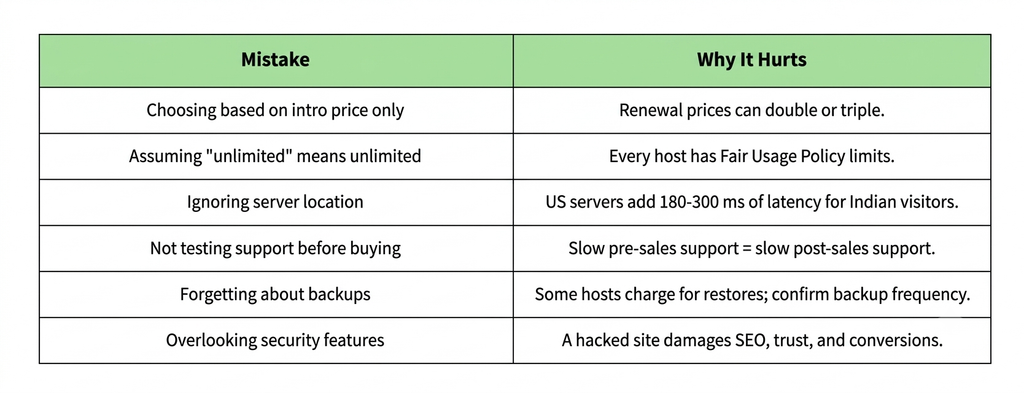
If your audience is in India, then choose a host with data centers in India. This lowers latency from 180-300ms (US servers) to 10-40ms.
Rule of thumb: If more than 50% of your visitors are from India, host in India. If your audience is global, choose a host with multiple data center locations.
Web Server Software
- LiteSpeed: Built-in caching, Faster for WordPress, HTTP/3 support.
- Nginx: Fast, great for static content, good for high traffic sites.
- Apache: Default, versatile, but usually needs plugins to be competitive.
LiteSpeed Enterprise with LSCache is usually faster than Apache out of the box for WordPress.
Uptime Guarantee
Look for 99.9% uptime or better. The difference between 99.9% and 99.99% is something like 9 hours of downtime a year vs less than 1 hour.
Check the terms: Does the host offer compensation if uptime falls below the guarantee?
Resource Limits
Every plan has limits. Look for hosts that publish:
- CPU cores: How much processing power you get.
- RAM: Memory allocated to your account.
- IOPS: Input/output operations per second. Higher is better for database-heavy sites.
- Entry processes: How many scripts can run simultaneously.
- Inodes: Total files you can store (50,000-250,000 is typical).
Avoid hosts that hide these limits or advertise “unlimited” without publishing Fair Usage Policy terms.
Security Features
Essential security features to look for:
- Free SSL certificate
- Regular backups (daily or weekly)
- Malware scanning and removal
- Firewall protection
- DDoS mitigation
- Automatic updates for CMS and plugins
Customer Support
Test support before you buy. Send a pre-sales question. Check:
- Response time (under 1 hour is good)
- Channels available (live chat, email, phone)
- Quality of response (generic or specific?)
Step 4: Check Pricing and Renewal Rates
Entry Price vs Renewal Price
Before selecting a plan, compare the introductory price, renewal rates, billing period, and included features. This guide to web hosting plans and prices explains how to evaluate hosting options and choose a plan that fits your budget.
Before you buy:
- Find the renewal price (usually in terms or at checkout)
- Multiply by 12 to get annual cost
- Compare annual renewal costs across hosts, not intro prices
Hidden Costs
Watch for:
- SSL certificate (some hosts charge extra)
- Domain registration (often bundled first year, then paid)
- Backup restoration (some hosts charge per restore)
- Migration fees (some hosts charge to move your site)
- Add-on features (CDN, dedicated IP, premium support)
Money-Back Guarantee
A good host offers at least a 30-day money-back guarantee. This lets you test the service risk-free.
Step 5: Test Support Before Buying
Customer support is critical when something goes wrong. Test it before you commit.
How to test:
- Send a pre-sales question via live chat or email
- Note on response time
- Quality Assessment: Specific or General?
- Post a technical question about your requirements
If the support is slow or unhelpful before you buy it will not get any better after.
Step 6: Plan for Growth
Your website will grow. Pick a host that can scale with that growth.
What to watch for:
- Upgrade paths: Can I upgrade from shared to VPS to dedicated without migrating?
- Scalability: does the host provide cloud plans that scale automatically?
- Resources flexibility: Can you scale up CPU, RAM or storage as needed?
Every time you need to grow, it’s a pain in the ass and expensive to be on a host that requires a full migration.
Common Mistakes to Avoid
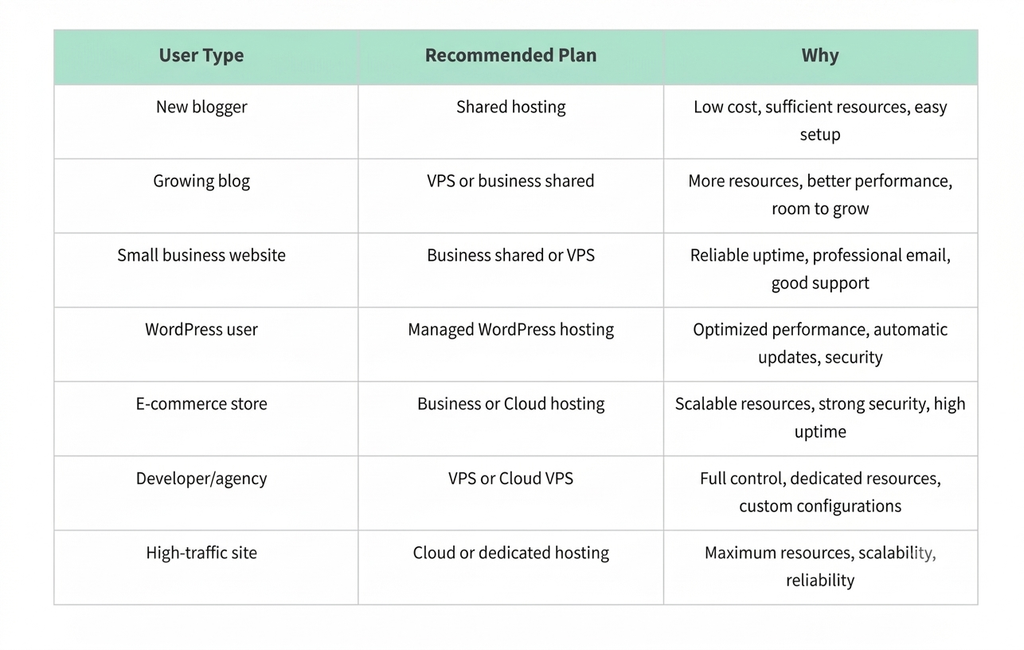
Decision Framework: Which Plan for Which User
What to Do Next
Choosing a web hosting plan starts with understanding your website’s requirements, expected traffic, storage needs, and budget. Compare the available hosting types, server resources, security features, and customer support before making a decision.
Before purchasing a plan, review the full upfront cost, renewal price, billing period, and any additional charges for domains, backups, or optional services. Choose a plan that meets your current needs while leaving enough room for your website to grow.
Taking the time to compare these factors will help you make an informed hosting decision and avoid unexpected costs as your website develops.
Frequently Asked Questions
What is the best web hosting plan for a new website?
For a new website with low traffic, shared hosting is usually sufficient. Look for plans with at least 10 GB storage, NVMe SSD storage, free SSL, and a 30-day money-back guarantee.
How much should I pay for web hosting in India?
Entry-level shared hosting in India ranges from ₹69 to ₹300 per month on introductory pricing. Renewal rates are typically higher. VPS and managed cloud hosting range from ₹500 to ₹2,500+ per month.
What is the difference between NVMe and SATA SSD?
NVMe SSDs connect over PCIe lanes and reach 3,000-7,000 MB/s. SATA SSDs top out around 500-550 MB/s. For database-heavy sites like WordPress or WooCommerce, NVMe reduces query delays noticeably.
How do I check if a host has good uptime?
Look for a published uptime guarantee of at least 99.9%. Check independent uptime monitoring tools and reviews. Some hosts publish public uptime status pages.
Can I upgrade my hosting plan later?
Most hosts allow upgrades. Check the process: Is it seamless? Do you need to migrate manually? Some hosts require full migration when moving between plan types.
What is a money-back guarantee in hosting?
A money-back guarantee lets you try a hosting service risk-free. If you are not satisfied within the guarantee period (typically 30 days), you can request a full refund.
How do I migrate my website to a new host?
Most hosting companies offer free migration services. They will move your website files, databases, and emails to their servers. This is usually done with zero downtime.
