

Your website is only as safe as the weakest link in its hosting setup. Most break-ins don’t involve clever hackers. They happen because of reused passwords, outdated plugins or a forgotten account nobody checked. Following web hosting security best practices closes those gaps before attackers find them. This guide covers ten practical ways to protect your website, from strong logins and two-factor authentication to backups, firewalls and monitoring. Each tip is simple enough to apply this week. Work through them, and you’ll build layered protection that keeps your data, your customers and your reputation safer.
What Is Web Hosting Security?
Web hosting security is the set of protections that keep your website, server, data and email safe from unauthorised access, malware, data loss and attacks. It’s shared between two parties: your hosting provider secures the server and network, and you secure your account, your software and your habits. If either side slacks, the whole setup is weaker.
Who Is Responsible for Security: You or Your Host?
Both. Your host protects the infrastructure, and you protect everything you install and every login you create.
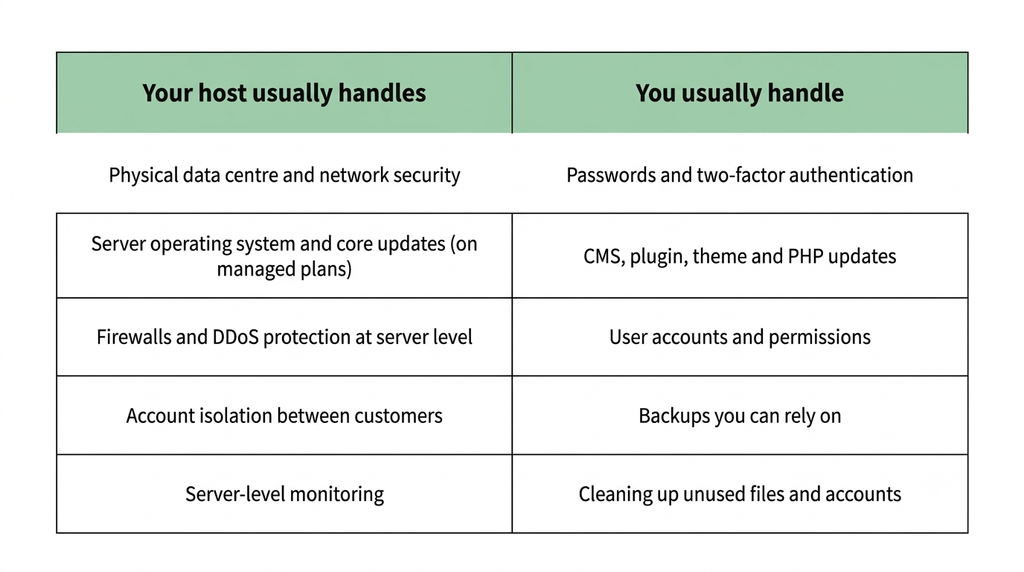
On unmanaged VPS plans, more of this falls on you, including operating system updates and firewall setup. Always check what your plan covers.
1. Choose a Hosting Provider That Takes Security Seriously
Pick a host that includes account isolation, firewalls, malware scanning, automatic backups, free SSL and responsive 24/7 support.
Security starts before you sign up. A cheap plan without these basics can cost you far more later. Ask these questions:
- Are accounts isolated from each other on the server?
- Is malware scanning included, and is it automatic?
- Are backups included, how often do they run and where are they stored?
- Is there DDoS protection and a server-level firewall?
- How quickly does support respond to a security incident?
Our 15-point checklist on what to check before buying web hosting covers these questions and more.
2. Use Strong, Unique Passwords
Use passwords of at least 12 to 16 characters, never reuse them and store them in a password manager.
Stolen and reused passwords are among the most common ways accounts get compromised. Apply this to every login connected to your site: hosting, cPanel, FTP, databases, CMS admin, email and your domain registrar. Change a password straight away if someone who had access leaves, or if you suspect it’s been exposed.
3. Turn On Two-Factor Authentication (2FA)
2FA asks for a one-time code in addition to your password, so a stolen password alone isn’t enough.
Enable it everywhere it’s offered, especially on your hosting account, domain registrar, CMS admin area and email. Use an authenticator app where possible, and keep your backup codes somewhere safe and offline.
4. Keep Everything Updated
Update your CMS, plugins, themes and PHP version regularly, because attackers actively scan for known flaws in old software.
- Turn on automatic updates for minor and security releases where it’s safe to do so
- Delete plugins and themes you don’t use, since inactive ones can still be exploited
- Replace anything that’s no longer maintained
- Run a supported PHP version, since unsupported ones stop receiving security fixes
Our guide to how to change PHP version in cPanel walks through the upgrade safely.
5. Use SSL and Force HTTPS
An SSL certificate encrypts data between your site and its visitors, and every site should use one.
Install a certificate, then redirect all HTTP traffic to HTTPS and fix any mixed content. Check renewal dates so a certificate never expires unnoticed. If you haven’t set one up yet, follow our guide to SSL setup in cPanel.
6. Add a Firewall and Malware Scanning
A web application firewall (WAF) blocks malicious requests, and malware scanning finds infected files.
Many hosts offer tools such as ImunifyAV, Imunify360 or ModSecurity, and some offer Cloudflare or similar services. Check what’s included in your plan and make sure it’s switched on. Add brute-force protection and login attempt limits too. Be careful about running several overlapping security plugins on WordPress, since they can slow your site down.
7. Back Up Your Website Regularly
Backups don’t prevent attacks, but they let you recover quickly from one.
- Back up daily or weekly, depending on how often your site changes
- Keep at least one copy away from your hosting server
- Back up before updates, migrations and major changes
- Test a restore occasionally, because an untested backup is only a hope
Our guide to cPanel backup and restore covers the full process.
8. Limit Access and Use Secure File Transfer
Give people only the access they need, and use SFTP instead of plain FTP.
- Give every person their own login instead of sharing one
- Use the lowest user role that lets someone do their job
- Remove accounts for former staff, freelancers and agencies promptly
- Use SFTP or FTPS so credentials aren’t sent unencrypted
- Set sensible file permissions. Folders are commonly 755 and files 644, and 777 should be avoided
9. Clean Up What You Don’t Use
Every unused account, database and test site is an extra way in, so remove them.
Review your hosting account every few months and delete:
- Old FTP and email accounts
- Unused databases and database users
- Abandoned subdomains, addon domains and staging sites
- Old backups sitting in public folders
- Unused plugins, themes and admin users
If you host several sites on one account, remember that a compromise in one can sometimes spread to the others. Keep unrelated or high-risk sites separate where you can.
10. Monitor Your Site and Know the Warning Signs
Check your logs, scans and alerts regularly, and act quickly on anything unusual.
Warning signs include:
- Unexpected redirects or pages you didn’t create
- Unknown admin users or recently changed files
- Sudden traffic spikes or slowdowns
- Browser or Google Search Console security warnings
- Spam sent from your email addresses
Set up uptime monitoring and alerts, check Google Search Console and review login and access logs from time to time. Early detection often turns a disaster into a quick fix. Our guide on website hacking prevention explains how to detect and recover from attacks in detail.
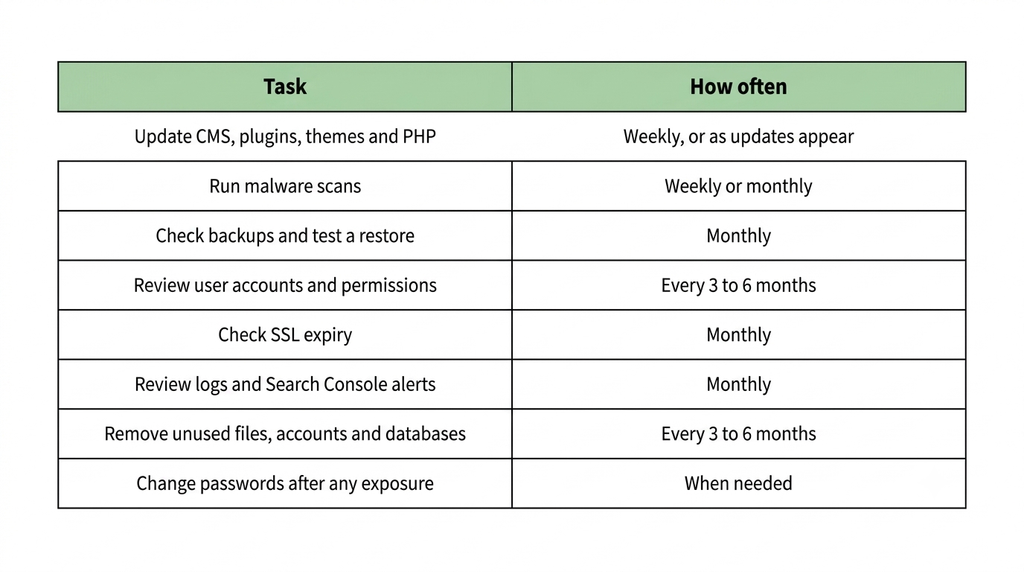
Web Hosting Security Checklist
Shared Hosting vs VPS: What Changes for Security?
On shared hosting, your provider handles most server-level protection, and your job is to secure your account and software. On a VPS, you get more control and more responsibility. Unless you have a managed plan, you may need to handle operating system updates, firewall rules and server hardening yourself. Our guide to shared hosting vs VPS hosting explains the trade-offs.
What to Do If Your Website Gets Hacked
- Contact your hosting provider straight away.
- Change all passwords from a clean device: hosting, cPanel, FTP, database, CMS and email.
- Scan for malware and remove it, or restore a clean backup made before the infection.
- Update everything and delete outdated or unused plugins and themes.
- Find and close the entry point, and check for backdoors such as unknown users or hidden files.
- Monitor closely for several weeks in case the problem returns.
Secure Your Site with Cyberin
Good habits matter, but they work best on a platform that supports them. When you compare plans, look for free SSL, automatic backups, malware protection and responsive support. To see how Cyberin’s cPanel hosting plans handle these, check the current security features, backup terms and support options before you buy. For account-level settings, our guide on how to secure your cPanel hosting account is a good next step.
Conclusion
Web hosting security best practices aren’t complicated. Choose a host that takes security seriously, use strong passwords with 2FA, keep your software updated and install SSL. Add a firewall and malware scanning, back up regularly, limit access, clean up unused items and keep an eye on your site. No single step makes you invulnerable, but together they make your site a much harder target than most. Start with the first three today, and work through the rest over the coming weeks.
Frequently Asked Questions
1. What are the most important web hosting security best practices?
Use strong unique passwords, enable two-factor authentication, keep your CMS, plugins and PHP updated, install SSL, run a firewall and malware scanning, and back up regularly. Limiting access and monitoring your site matter too.
2. How do I know if my web hosting is secure?
Check whether your host provides account isolation, firewalls, malware scanning, free SSL, automatic backups and quick support. Your own habits, such as updates and passwords, matter as much as the server.
3. Is shared hosting safe?
It can be when the provider uses proper account isolation and security tools and you keep your own software updated. Sites with higher security needs, such as stores that handle payments, may be better suited to a VPS or managed plan.
4. Do I need a firewall for my website?
A web application firewall is strongly recommended. It filters malicious traffic before it reaches your site, and many hosts include one or offer it as an add-on.
5. How often should I back up my website?
It depends on how often your site changes. Weekly suits many blogs, and daily suits stores or membership sites. Always keep at least one copy off the server.
6. Does SSL make my website secure?
SSL encrypts data in transit and is essential, but it doesn’t protect against malware, weak passwords or outdated software. Treat it as one layer among several.
7. What should I do first if my website is hacked?
Contact your host, change all related passwords from a clean device, and scan for malware or restore a clean backup. Then update your software and look for any backdoors.
