

If you are deciding on a VPS hosting plan in India, don’t just go by the monthly prices. A plan will be right for your website or application, because of the amount of RAM, CPU power, NVMe storage, bandwidth and server management it offers. A small business site will do well with a simple VPS, but an eCommerce store or a demanding application will need more resources.
Understand the various configurations of VPS server in India and their impact on performance and cost before purchasing it. In this guide, we’ll cover how to pick the right VPS resources, what features are worth comparing, and what configuration might be right for you.
VPS Hosting Price in India: What Determines the Cost?
Before moving to VPS hosting, it is also useful to understand how shared web hosting plans differ in terms of pricing, resources and included features. Read our guide to web hosting plans and prices in India.The VPS hosting price is determined by the server resources and features offered in each package. It is also known as shared hosting . Here are a few sites on a hosting environment. A Virtual Private Server is a dedicated part of the server’s resources.
Following are some of the most common factors that affect the cost of a VPS server in India:
- RAM: How much data and processes your server can run simultaneously.
- CPU Cores: Number of website requests, applications and background processes that can be handled.
- Storage: This is the space you get to store your website files, databases, applications and backup’s.
- Bandwidth : The amount of data that your server can send over the network.
- Server Management – Managed services may comprise technical support, updates, monitoring and maintenance.
- Backup facilities. The total hosting fee can be influenced by additional storage and backup facilities.
- Operating System: Windows VPSs and Linux VPSs have different licensing terms and costs.
So when comparing prices of VPS hosting India, look for the full configuration and not just the monthly price that is quoted.
How Much RAM Do You Need for a VPS Server?
RAM is one of the most important things to consider when you make a VPS choice. You can run operating system, databases, web server and application on your server.
How much RAM you need depends on what software you run and how many processes you run simultaneously.
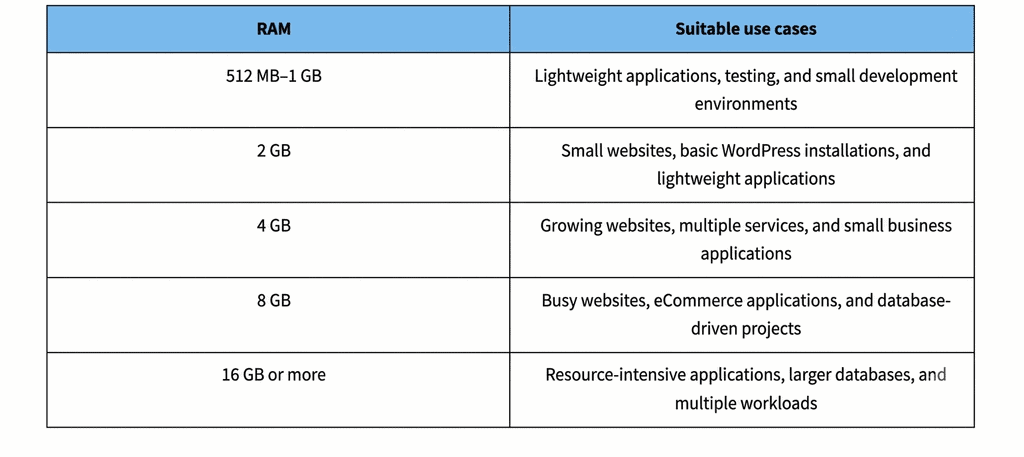
These are not guarantyd capacity limits, but rather general starting points. A static website will not require as much memory as a WordPress website that comes with a lot of plugins , page builders and database intensive features.
If your server often runs out of memory, applications can slow down or processes can fail. Check your ram usage and see if you need to get an upgrade.
How Many CPU Cores Do You Need?
The CPU cores are the ones that run the processes and instructions on your VPS. They affect the performance of your server in terms of serving requests, running scripts and background jobs.
CPU requirements are dependent on complexity of application, traffic patterns and concurrent workloads.
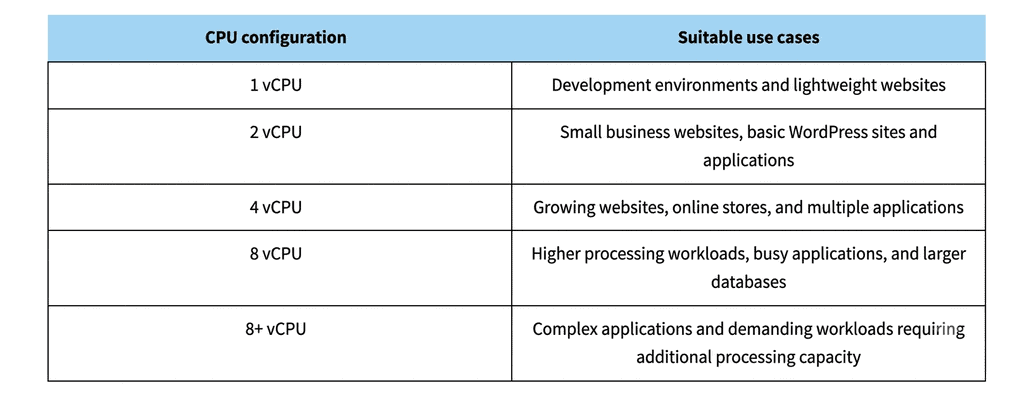
Giving a VM more CPU doesn’t magically speed up every website. Website performance also depends on RAM , storage speed , caching , application code and database optimisation .
If your CPU usage is often maxed out under normal traffic, look into a configuration with more processing power.
How Much Storage Does Your VPS Need?
VPS Storage is where your Operating System, website files, databases, application files, logs and other server data is stored.
Many VPS providers provide SSD or NVMe SSD storage. NVMe storage can offer higher data transfer performance and lower latency compared to traditional SATA-based SSD storage, depending on the hardware and workload.
General storage have to think about:
- 20-30 GB: Lightweight websites, test environments and small applications.
- 40–60 GB: Business websites, WordPress installations, moderate file storage.
- 80-120 GB: Websites, online stores and applications with larger databases that are expanding.
- 160 GB + Large databases and projects with large file storage requirements . Multiple applications.
Also, the operating system, and the installed software consume storage space. Leave some extra space for the database to grow, for logs, updates and temp files.
If your website has large images, videos or downloadable files, think about whether separate object storage might be better than keeping everything on the VPS.
How Much Bandwidth Do You Need?
Bandwidth is the amount of data transferred between your VPS and the users or services connected to it.
Your bandwidth requirements are determined by:
- Monthly website traffic
- Average page size
- Embed Image & Video
- Downloads
- API Calls
- App activity
A multimedia Web site will generally use more data than a text-only Web site. An online store with product images and lots of customer interaction might need more bandwidth.
Before you decide to purchase a VPS hosting plan, verify whether the provider offers monthly bandwidth allowance or unmetered transfer with fair use policy or extra charges for exceeding a limit.
Check the network speed, see if there is any port speed limit in the plan.
Root Access: Why Does It Matter?
You will have admin access to your Linux VPS with root access. You install whatever software you need for your application. You’ve installed the server.
With root access you can do:
- Install and configure web server (apache, nginx, etc.)
- Select supported PHP versions & setup
- Installing a DBMS
- Set up firewall rules and security settings
- Manage users and permissions across the server.
- Deploy custom apps & dev environments.
Root access is especially useful for developers and system administrators. It’s also great for businesses requiring a custom server configuration.
But it is also a duty. Incorrect permissions , firewall settings or software configurations can impact security and availability of the server .
If you are a novice at server management, think about managed VPS hosting or technical support from an expert.
Managed vs Unmanaged VPS Hosting: Which Should You Choose?
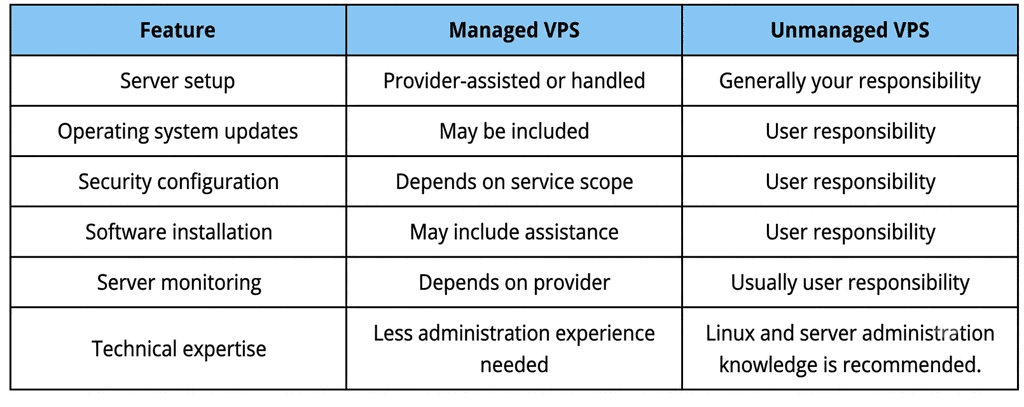
One important decision when buying a VPS server in India is whether to choose managed or unmanaged hosting.
When Should You Choose Managed VPS?
Managed VPS hosting is a great solution for companies that want to concentrate on their websites and applications and not worry about all the server maintenance issues.
This can be helpful if you don’t have a system administrator on staff, or you need help configuring and maintaining your server.
Always check what is included in the provider’s managed services. Basic tech support is not complete server management.
When Should You Choose Unmanaged VPS?
If you are a developer or a technical team or an experienced user who wants to have direct control over the environment of your server, then unmanaged VPS hosting is the right solution.
It gives you a power to install the applications and configure software and manage the server resources by yourself.
You need to know about updates, security, monitoring, troubleshooting, and backups.
VPS Backups and Security: What Should You Check?
Backups help you recover your site and application data from accidental deletion, software errors and unexpected server problems.
Before buying a VPS plan, check:
- If they’re doing automatic backups.
- How often are backups taken?
- Retention period of backup copies.
- If the cost to restore a backup is . –
- VPS does not include backups.
- The snapshots are there.
Do not assume that a VPS plan comes with full backup protection. Ask your provider about their backup policy.
Other common server security practices to consider include SSH key authentication, firewall configuration, regular software updates, strong passwords, and limited administrative access.
Which VPS Configuration Is Right for Your Website?
What is the best VPS configuration for your website? ## How to correctly configure a VPS? … It is contingent upon what your site needs right now, your expectations of growth.
Some general examples of here:
1. Small Business Website
A small company website with a couple of basic pages, contact forms and limited dynamic functionality would start with:
- 1–2 vCPU
- Ram—2GB.
- SSD / NVMe 40-60 GB
Depending on the application and traffic, this setup can be a starting point for light weight websites.
2. WordPress Website
A WordPress website with theme, plugins, caching and a moderate content library can begin at:
- 2 vCPU (virtual)
- 2-4 Gb RAM
- NVMe storage 40-80gb
Sites that use resource-heavy plugins, page builders or multiple services might need more. If you are specifically planning to host a WordPress website, compare WordPress hosting plans, features and pricing before deciding between shared WordPress hosting and a VPS.
3. eCommerce Website
A web store handles product listings, user accounts, database queries, orders, and payment processes.
For example a starting configuration is:
- 2-4 CPUs
- Memory (RAM) 4 GB – 8 GB
- NVMe Storage 80-120GB
The actual requirements depend on: product volume, number of concurrent users, database activity, application optimisation.
4. Web Applications and Development Projects
Custom applications, APIs and development environments may have different configurations based on frameworks, databases and background processes.
A first configuration could be:
- 2-4 vCPUs
- 4-8 gigs of ram
- NVMe SSD, 60-120GB
More demanding applications may require more resources.
These are good starting points but no guarantees of performance. Monitor your resource usage and adjust your plan as the project evolves.
How to Choose the Right VPS Hosting Plan in India
Here is a checklist to help you choose a VPS Hosting plan:
- Identification of resource requirements Find out your app’s RAM, CPU and storage requirements.
- Check root access: Make sure you have full admin rights.
- Know your bandwidth limitations, know your monthly transfer limits and network restrictions.
- Look at the backup policies (frequency, cost of retention and restore).
- Know your management responsibility: Ensure server maintenance is your responsibility or part of the package.
- Scalability: Make sure you can scale with your needs and add more RAM, CPU and storage.
- Review prices and renewal terms Check the original prices against the standard renewal price. Similarly, understanding the difference between introductory and renewal pricing can help you estimate long-term hosting expenses. Learn more about web hosting first-year and renewal costs.
- technical support check What is the support for OS, network and server issues?
When you are aware of these requirements, you can compare the VPS servers price in India based on the resources and services that matter for your project.
Explore Cloud VPS Hosting Plans
If you are looking to buy VPS server in India, compare available configuration of Cloud VPS based on RAM, CPU cores, NVMe storage, bandwidth and management requirement.
Look at the plans available and choose a configuration that fits your current workload. When you buy a plan, you can also think about the resources you will need in the future.
Explore Cloud VPS Hosting Plans to compare available configurations.
Frequently Asked Questions
1. What is the VPS hosting price in India?
The price of VPS hosting in India depends on RAM, CPU cores, storage, bandwidth, server location and management features. Typically the basic plans are cheaper, while the more expensive plans have more resources and managed services.
2. How much RAM is enough for a VPS?
You might get away with 1-2 GB RAM to start for a small site. For wordpress sites and small apps this can be 2-4GB. If your eCommerce sites and apps are resource intensive, then you might need 4-8 GB or more.
3. Is 2 GB RAM enough for WordPress hosting?
Yes 2GB RAM is fine for a small WordPress site with moderate traffic well optimised. If you have several plugins, page builders or other resource heavy features on your site then 4GB RAM or more would be helpful too.
4. Does VPS hosting provide root access?
Most Linux VPS hosting providers offer root access, so you can install software and control server settings. But before you purchase a plan, take a look at this feature.
5. What is the difference between managed and unmanaged VPS hosting?
Managed VPS hosting plan includes server administration services as per provider’s scope of service. You will need to set up, secure, update and maintain your own server with unmanaged VPS hosting.
6. Can I upgrade my VPS resources later?
Most VPS providers allow the user to scale up resources like CPU, RAM and storage. But the upgrade possibilities and the downtime needs are dictated by the provider’s infrastructure and policies.
7. Is VPS hosting suitable for an eCommerce website?
Yes, VPS hosting offers dedicated resources and more configuration control for eCommerce applications. Your requirements will depend on how much product you have, how many people you expect at any one time and how active your database is and what your application requirements are.
