

NVMe and SATA SSD hosting both run on solid-state storage. The difference is in how the drive talks to the server, and NVMe does it faster, with lower latency and better performance when the workload gets heavy.
But a faster drive doesn’t automatically mean a faster website. If you run a small blog or portfolio, standard SSD hosting will probably do the job. If you run a busy online store, a membership site or anything that hammers its database, NVMe can make a real difference.
This guide explains how the two compare, how storage affects site speed, and how to decide whether the extra cost is worth paying.
Why Storage Type Matters
When people compare hosting plans, they usually look at price, bandwidth, disk space and uptime. The type of drive behind the plan gets far less attention, even though it affects how quickly the server can fetch your files and database records.
You’ll run into three kinds of storage:
- HDD (Hard Disk Drive): Spinning magnetic disks. The slowest of the three.
- SSD (Solid State Drive): Flash memory with no moving parts, so it’s much quicker than an HDD.
- NVMe SSD (Non-Volatile Memory Express): Flash storage that connects over PCIe instead of the older SATA interface, giving it higher bandwidth and lower latency than a typical SATA SSD.
The gap matters most when your site reads and writes a lot of data. Here’s how each one works.
What Is SSD Hosting?
An SSD stores data on flash memory rather than spinning disks. With no moving parts, it can reach your data far faster than an HDD. On a hosting server, that storage holds your website files, databases, images and applications.
SSD hosting gives you:
- Faster data access than HDD
- Quicker file and database operations
- Lower latency than mechanical drives
- No moving parts to wear out
For small and mid-sized sites, a standard SSD is usually plenty. A personal blog, a portfolio or a simple business site is unlikely to need anything faster.
Worth checking: Does the plan say what kind of SSD it uses? Some providers just write “SSD” and never mention whether it’s SATA or NVMe.
What Is NVMe Hosting?
NVMe is a protocol built specifically for flash storage. Where SATA SSDs use the older SATA interface, NVMe drives connect through PCIe. That lets them handle many more operations at once and move data faster, with less delay.
In practice, NVMe gives you:
- Higher potential read and write speeds
- Lower latency
- Better handling of many simultaneous input and output operations
- A better fit for demanding workloads
It’s most useful for sites and apps that constantly query databases, process transactions or work with lots of files.
Worth checking: Is NVMe included in the plan you’re looking at, and is it on every tier or only the pricier ones? If a provider writes “SSD/NVMe” without saying which you actually get, ask them.
How Fast Are They, Really?
The main difference between SATA SSDs and NVMe drives is how fast they can transfer data. These numbers are rough examples. Real speeds depend on the drive model, the PCIe generation, the server setup and the workload.
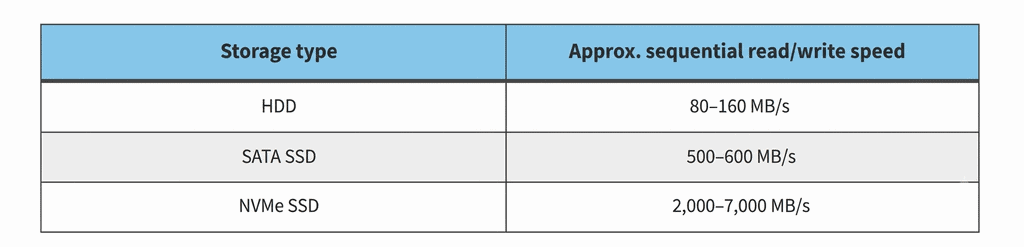
On paper, NVMe can be several times faster than a SATA SSD. But those figures come from specific benchmark conditions. They don’t mean your website will load several times faster after you switch.
Storage speed affects how quickly the server reads your files, how database queries get their data, and how applications read and write. If your site mostly serves cached pages, you probably won’t notice much difference. If it does a lot of database work, you’re more likely to.
What It Means for Different Kinds of Sites
How much NVMe helps depends on what your site actually does.
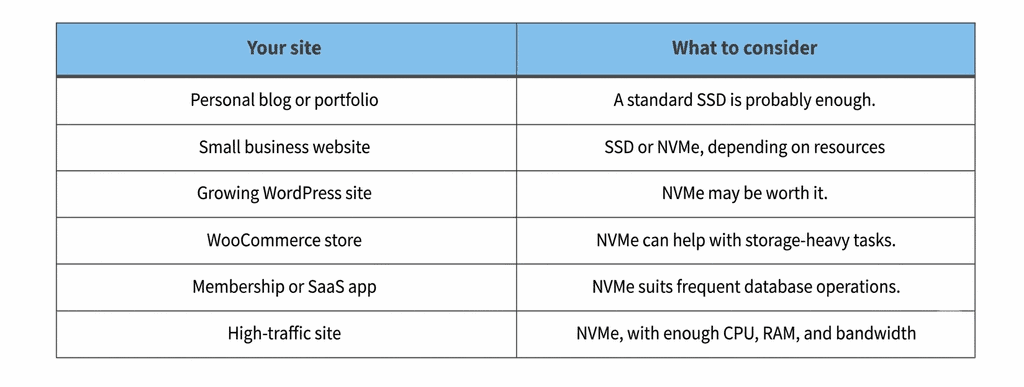
Small blog or portfolio. Mostly static pages and modest traffic run fine on standard SSD. With caching set up properly, visitors are unlikely to notice any difference.
Growing blog or business site. As you add content, plugins and visitors, the database gets busier. NVMe can help with those frequent reads and writes, though CPU, RAM and caching matter just as much.
WooCommerce store. Stores constantly hit the database for products, customers, stock and orders. NVMe can help when storage is the bottleneck. But checkout speed also depends on your code, your payment gateway, your database setup, caching and server resources.
Membership or SaaS site. Lots of logins, account lookups and application data means plenty of storage activity. NVMe can help, but how much depends on how the application is built and what resources the server has.
High-traffic site. Plenty of simultaneous requests can put pressure on storage, and NVMe eases that. Still, storage alone doesn’t decide how much traffic a server can take. CPU, RAM, caching, database tuning and the network all count too.
When Is It Time to Upgrade to NVMe?
Moving from SSD to NVMe is worth thinking about if:
- Your site does a lot of database work. Frequent reads and writes benefit from lower storage latency.
- You run a store or membership site. These generate dynamic requests and access stored data constantly.
- Monitoring shows a storage bottleneck. If you’re seeing high disk activity or latency, faster storage may help.
- You expect to grow. Make sure the plan can handle where you’re heading.
- The price gap is small. If NVMe costs only a little more, weigh that against what you’d actually gain.
For small sites with modest traffic and light database use, standard SSD is still a perfectly good choice.
And if your site is slow, find out why before you spend anything. NVMe won’t fix a lack of RAM, an overloaded CPU, badly optimised plugins or inefficient database queries.
What Else Slows a Website Down?
Storage is one piece of the puzzle. Even on NVMe, other limits can hold your site back:
- CPU: Handles scripts and requests. Too little power slows everything, especially when many processes run at once.
- RAM: Used by the operating system, applications, databases and caching. Running short hurts when traffic or workloads pick up.
- Caching: Browser, server-side and object caching cut down repeat processing and database calls. Good caching can speed up your site without any storage upgrade.
- Database optimisation: Slow queries, bloated tables and heavy plugins all add delay. Regular cleanup and tuning help.
- Web server configuration: How the server software is set up affects how requests are handled, and the best setup depends on your site.
- Server location and network: The farther your visitors are from the server, the longer content takes to reach them.
Look at these first to see whether storage is really what’s limiting you. You might also like our guide to resource limits in cPanel shared hosting.
How to Choose Between SSD and NVMe
Base the decision on what your site needs, not just on which drive is faster. If you’re comparing different hosting options, read our guide to web hosting plans and prices in India to understand the features and costs to consider before choosing a plan.
Before you buy, compare:
- Storage type: SATA SSD or NVMe
- Storage capacity: how much space you get
- CPU and RAM: whether they match what your application needs
- Database limits: restrictions on databases and connections
- Caching support: which options are available
- Traffic and bandwidth policies: the plan’s usage limits
- Renewal pricing: Compare the introductory price with the regular renewal cost. Our guide to first-year hosting costs vs renewal prices explains what to check before purchasing.
If you want a wider comparison of hosting types, see our guide to shared hosting vs VPS hosting.
Take a Look at Cyberin Web Hosting Plans
If you’re weighing SSD against NVMe, compare what each plan actually includes before you commit. Cyberin’s web hosting plans are a good place to start. Check the current details for storage type, capacity, CPU and RAM, website limits and renewal pricing.
Pick a plan for what your site needs now and where you expect it to go, rather than paying extra for storage speed you’ll never use.
Storage Mistakes to Avoid
Picking storage isn’t just about chasing the biggest speed number. Watch out for these.
Assuming all SSDs are the same. SATA SSDs and NVMe SSDs both use flash memory, but their interfaces and protocols differ. Check exactly which one the plan includes.
Choosing HDD just to save money. HDD is generally slower than SSD and NVMe. Think about whether the lower price is worth the trade-off.
Upgrading to NVMe without checking your needs. A low-traffic blog may not gain enough to justify the extra cost. Look at your real workload first.
Not checking which plans include NVMe. Some providers only offer it on certain plans. Read the plan specs, not just the marketing.
Ignoring everything else. Fast storage can’t make up for too little CPU or RAM, poor caching, an unoptimised database or a badly configured web server.
Conclusion
NVMe offers higher potential speeds and lower latency than SATA SSD, and it’s a good fit for sites with frequent database activity, dynamic applications and storage-heavy workloads. Plenty of small blogs, portfolios and business sites will do just as well on standard SSD. Paying extra for NVMe makes sense when your workload can use the speed and the cost fits your budget.
Before you choose, look at storage alongside CPU, RAM, caching, database performance, server location and resource limits. A well-balanced setup matters more than storage speed on its own.
Frequently Asked Questions
1. Is NVMe better than SSD hosting?
NVMe is faster than SATA SSD in terms of transfer speed and latency. It is contingent upon what workload, traffic and server resources you have, so it’s either better or not for you.
2. Do I need NVMe hosting for a WordPress blog?
Not necessarily so. A regular SSD will be perfectly fine for a WordPress blog that does not get much traffic. If the site grows or does more database work, it is worth thinking about NVMe.
3. Is HDD still used in web hosting?
But some providers still use it, especially for storage-focused services. SSD and NVMe are usually the better choice for sites where the speed of accessing data is important.
4. How do I check whether my host uses NVMe?
Check out plan specs or contact support. See if the drive is SATA SSD or NVMe and if that is what the server your site will be on.
5. Is NVMe hosting worth the extra cost?
It can be for websites with a lot of database operations, dynamic applications or storage intensive workloads. For smaller sites the performance of a normal SSD is usually enough without the extra cost.
6. Can I upgrade from SSD to NVMe hosting later?
That depends on your provider and what plans they offer. Some will allow you to do in place upgrade others will require migration to another server. Before you switch, be sure to check the upgrade path, migration steps and possible downtime.
